550 5.1.1 and Other Hard Bounce Codes: When to Suppress
Only one kind of bounce should be suppressed after a single send: one that tells you the address itself is dead. The mailbox doesn't exist, it has been disabled, or its domain can't receive mail. This guide shows what those bounces look like at Gmail, Microsoft, Yahoo and iCloud, plus other ISPs and the corporate gateways that sit in front of most B2B mailboxes. It also covers how to tell them apart from the temporary failures and policy blocks that share the same 4xx or 5xx label.
If your bounces carry 5.7.x codes, the provider is usually refusing your mail, not the address. That's a sender problem, covered in Hard Bounces vs. Spam Complaints (and Block Bounces). A few providers are exceptions, and they're listed below.
- Suppress based on the enhanced status code and the response text, not the 550. The same 550 can mean a dead mailbox or a policy block.
- Most address bounces happen at the RCPT TO step, before your message is sent. A verifier checks the same step, so it can find these addresses before you send.
- A full mailbox or an oversized message is not a reason to suppress. Neither says the address is dead.
- Provider wording differs. Not every provider uses 550 or 5.1.1 for a missing mailbox, and a few use 5.7.x. Read the full response text.
Where address bounces come from: the RCPT TO step
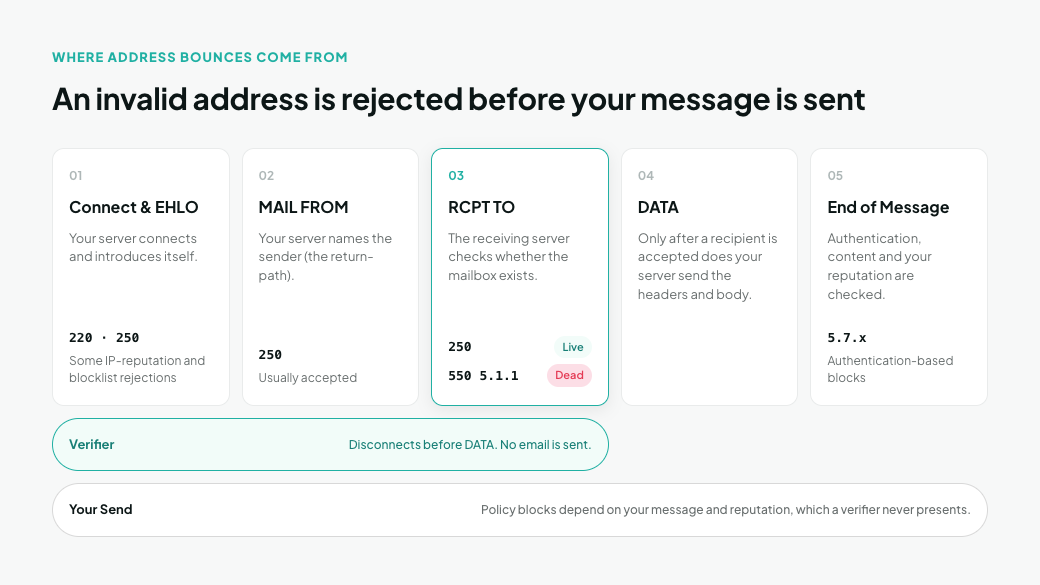
An invalid address is rejected before your message is sent. Every delivery attempt is a short conversation between your sending server and the receiving server, and the receiving server answers each step with a code:
- Connect and EHLO. Your server connects and introduces itself. The receiving server replies 220, then 250. Some IP-reputation and blocklist rejections already happen here.
- MAIL FROM. Your server names the sender (the return-path). This is usually accepted with 250.
- RCPT TO. Your server names the recipient. The receiving server checks whether that mailbox exists. A dead address gets a 5xx here, typically 550 5.1.1. A live one gets 250.
- DATA. Only after a recipient is accepted does your server send the headers and body.
- End of message. The receiving server checks the message itself: authentication, content and your reputation. Authentication-based blocks (5.7.x) come here, because DKIM needs the body to check the signature.
That order is why verification works. A verifier opens the same conversation, asks the RCPT TO question, records the answer and disconnects before DATA. No email is sent, and the recipient never sees anything.
It's also why verification can't predict policy blocks. Those depend on your message and your sending reputation, which a verifier never presents.
Not every server gives its answer at RCPT TO. Catch-all domains accept every recipient. Yahoo's own sample bounce shows its "user doesn't have a yahoo.com account" rejection arriving after the message was sent (Yahoo SMTP error codes). Other servers accept everything and send a separate bounce email later. These are the addresses a verifier may return as unknown or risky instead of good or bad.
How to read a bounce: three parts
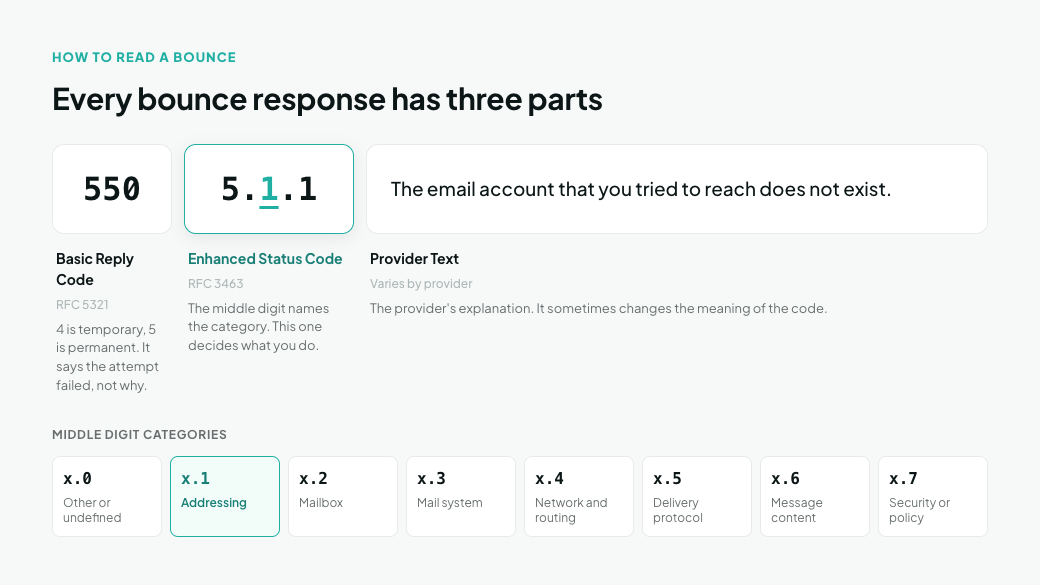
Every bounce response has three parts, and the middle one decides what you do with the address. Here's a typical Gmail response, with the trailing help link and server ID cut:
550 5.1.1 The email account that you tried to reach does not exist. Please double-check the recipient's email address for typos or unnecessary spaces.
- 550 is the basic reply code (RFC 5321). The first digit says whether the failure is temporary (4) or permanent (5). It tells you the attempt failed, not why.
- 5.1.1 is the enhanced status code (RFC 3463). Its middle digit names the category: 0 is other or undefined, 1 is addressing, 2 is the mailbox, 3 is the mail system, 4 is network and routing, 5 is the delivery protocol, 6 is message content, and 7 is security or policy.
- The text is the provider's explanation. Wording varies by provider, and it sometimes changes the meaning of the code.
Gmail shows why the text matters. It uses 550 5.2.1 both for an inactive account and for a mailbox that is receiving mail too fast to accept more (Gmail SMTP errors and codes). The first is a dead address. The second is a busy one.
Providers don't always pick the category you'd expect, either. Outlook.com reports a missing mailbox with 5.5.0, a protocol-class code, and Microsoft 365 sometimes uses 5.4.1 or 5.7.x. Match on the text, not just the digits.
The basic codes you'll see on address bounces are 550 (mailbox unavailable), 551 (user not local), 552 (storage exceeded), 553 (mailbox name not allowed) and 554 (transaction failed). None of them alone tells you whether to suppress. A 550 can be a dead mailbox or a policy block, and some providers report a missing mailbox with 554.
Hard bounce codes at Gmail, Microsoft, Yahoo and iCloud
Each major provider words a dead address differently, and two of the four usually report a missing mailbox with something other than 5.1.1. Match on the response text as well as the code.
Provider | Response (shortened) | What it means | What to do |
|---|---|---|---|
Gmail | 550 5.1.1 The email account that you tried to reach does not exist. | Mailbox doesn't exist | Suppress |
Gmail | 550 5.2.1 The email account that you tried to reach is inactive. | Account disabled (older bounces say "disabled") | gmail.com: suppress. Company domain on Google Workspace: pause, suppress if it repeats |
Gmail | 550 5.2.1 The user you are trying to contact is receiving email at a rate that prevents additional messages… | Mailbox is flooded, not dead | Retry later; don't suppress |
Gmail | 552 5.2.2 The recipient's inbox is out of storage space and inactive. | Full and abandoned | Suppress |
Outlook.com, Hotmail, Live | 550 5.5.0 Requested action not taken: mailbox unavailable | Address not found | Suppress |
Microsoft 365 | 550 5.1.10 RESOLVER.ADR.RecipientNotFound; Recipient not found by SMTP address lookup | Recipient doesn't exist | Suppress |
Microsoft 365 | 550 5.4.1 Recipient address rejected: Access denied | Recipient doesn't exist in the company's directory | Suppress |
Microsoft 365 | 550 5.7.504 Recipient address rejected: Access denied, or 5.7.505 Access denied, banned recipient | Recipient isn't valid | Suppress |
Yahoo, AOL | 554 delivery error: dd This user doesn't have a yahoo.com account | Account doesn't exist | Suppress |
iCloud (icloud.com, me.com, mac.com) | 550 5.1.1 <address>: user does not exist | Mailbox doesn't exist | Suppress |
iCloud | 550 5.1.1 <address>: inactive email address | User has deactivated this address | Pause; suppress if it repeats |
Sources: Gmail SMTP errors and codes, Exchange Online NDR reference, Yahoo SMTP error codes, Postmastery iCloud page.
Five exceptions are worth knowing:
- Some providers use 5.7.x for a dead address. Microsoft's 5.7.504 and 5.7.505 both mean the recipient isn't valid, even though 5.7.x normally signals a sender problem. Yandex and Proofpoint do the same; see the next section.
- Microsoft uses 5.4.1 for two things. "Recipient address rejected: Access denied" means the recipient doesn't exist. "Relay Access Denied" means the receiving server doesn't accept mail for that domain at all, usually a server or DNS misconfiguration. That one says nothing about the mailbox, so check the domain's MX record instead of suppressing.
- Microsoft's 5.1.10 has a different standard meaning. RFC 7505 assigns 5.1.10 to a domain that publishes a "null MX", meaning it accepts no mail at all. Either way, the address can't receive mail.
- Gmail's 5.2.1 "inactive" can come back on company domains. A Google Workspace admin can suspend an account and restore it later, for example during leave or an offboarding review. On a consumer gmail.com address, treat it as dead. On a company domain, pause the address and suppress it if the bounce repeats.
- iCloud uses 5.1.1 for two things. "User does not exist" is permanent. "Inactive email address" is a user-paused address that can come back. If 5.1.1 bounces suddenly spike across icloud.com, me.com and mac.com together, check for an Apple-side incident before you suppress in bulk.
You won't usually see a domain-not-found bounce (5.1.2) from these providers. When a domain doesn't exist, your own ESP's server generates the bounce after its DNS lookup fails. Gmail's 553 5.1.2 "We weren't able to find the recipient domain" is the version you see when sending through Gmail or Google Workspace. The decision table below covers both.
Other providers and corporate gateways
Outside the big four, wording varies even more, and several providers use unexpected codes for a dead address. B2B lists add another layer: many company domains sit behind a security gateway that answers before the real mail server does.
Other mailbox providers
Provider | Response (shortened) | What it means | What to do |
|---|---|---|---|
Comcast | 550 5.1.1 Not our Customer | Address doesn't exist | Suppress |
Comcast | 550 5.1.1 <address> recipient mailbox unallocated | Mailbox doesn't exist | Suppress |
AT&T (att.net, sbcglobal.net and other legacy domains) | 550 5.2.1 <address>... Addressee unknown | Address doesn't exist, despite the 5.2.x code | Suppress |
Zoho | 550 5.1.1 <address> User unknown | Mailbox doesn't exist | Suppress |
Yandex | 550 5.7.1 No such user! | User doesn't exist, despite the 5.7.x code | Suppress |
Mail.ru | 550 Message was not accepted -- invalid mailbox. … account is disabled | Account disabled | Suppress |
GMX, Web.de | 550 Requested action not taken: mailbox unavailable | Doesn't exist, or disabled for inactivity | Suppress if it repeats |
Orange (orange.fr) | 550 5.1.1 … Invalid recipient. OFR_416 | Address doesn't exist | Suppress |
Free (free.fr) | 550 5.2.1 This mailbox has been blocked due to inactivity | Blocked for inactivity | Suppress |
GMX and Web.de return a bare 550 with no enhanced code for missing mailboxes, full mailboxes and policy blocks alike. Only the text tells them apart.
Corporate email gateways
Gateway | Response (shortened) | What it means | What to do |
|---|---|---|---|
Proofpoint | 550 5.1.1 <address>: Recipient address rejected: User unknown | User doesn't exist | Suppress |
Proofpoint | 550 5.7.1 <address>: Recipient address rejected: User email address is marked as invalid. | Address marked invalid, despite the 5.7.x code | Suppress |
Proofpoint | 550 5.7.1 Relay access denied | Gateway doesn't accept mail for that domain | Check the domain's MX; suppress if it stays |
Barracuda | 550 cuda_nsu 5.1.1 <address>... User unknown, or 550 No such user | User doesn't exist | Suppress |
Broadcom Email Security.cloud | 550 Invalid recipient <address> (#5.1.1) | Recipient doesn't exist | Suppress |
Mimecast | 550 Envelope blocked - User Entry, or 550 Administrative prohibition - envelope blocked | The company's admin blocked your mail | Don't suppress. Ask to be allowlisted |
A gateway sits in front of the real mail server and sometimes passes on its answer. Proofpoint, for example, can quote the downstream server's "user unknown" inside its own bounce. Read the innermost response.
Source: Bento SMTP 550 field manual, adapted from the SMTP Field Manual by ActiveCampaign and Postmark.
The in-between cases
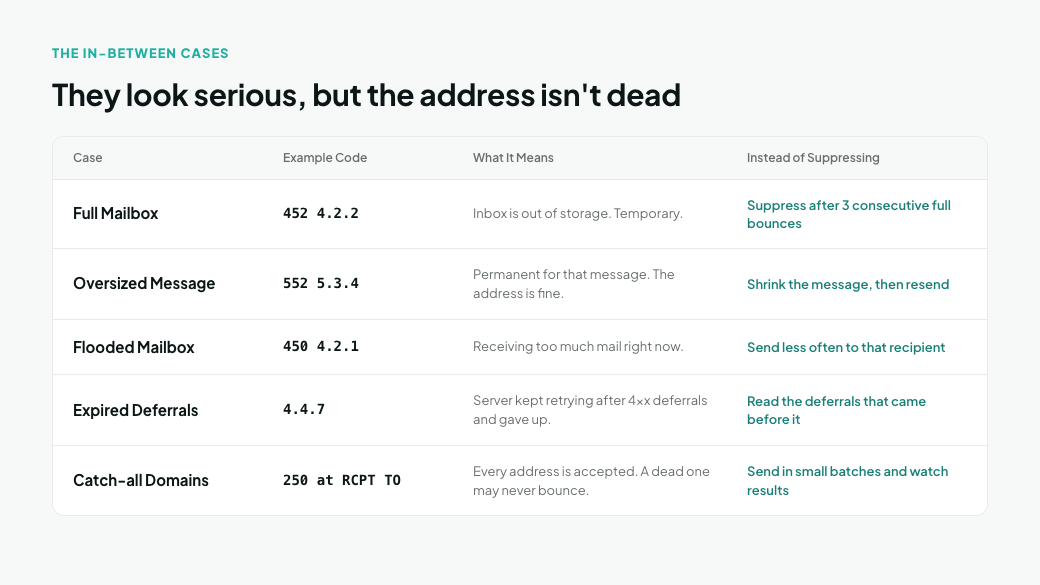
Five kinds of bounce look serious but don't prove the address is dead. Suppressing them throws away people who can still receive your mail.
- Full mailbox. Gmail returns 452 4.2.2 when an inbox is out of storage, and iCloud says "user is overquota". Both are temporary. Gmail's permanent version, 552 5.2.2 … out of storage space and inactive, is different: the account is full and abandoned, so suppress it. A common rule for the temporary version is to suppress after the same address comes back full on three consecutive sends.
- Oversized message. Gmail returns 552 5.3.4 when a message exceeds its size or header limits. It's permanent for that message, but the address is fine. Shrink the message or host the attachment, then resend.
- Flooded mailbox. Gmail's 450 4.2.1 and its rate-limit 550 5.2.1 mean the mailbox is receiving too much mail right now. Microsoft 365 uses 5.2.121 and 5.2.122 when a recipient's hourly receiving limit is hit. These are 5xx at Microsoft, but the address is live. Send less often to that recipient.
- Expired deferrals. A 4.4.7 Message expired bounce means a server kept retrying after 4xx deferrals and gave up. Many ESPs log it as a hard bounce. Look at the deferrals that came before it: 4.7.x deferrals mean the provider was throttling you, which is a sender problem.
- Catch-all domains. A catch-all server accepts every address at RCPT TO, so a dead address may never bounce at all, or may bounce later as a separate email. Treat these addresses as uncertain: send to them in small batches and watch the results.
Sources: Gmail SMTP errors and codes, Exchange Online NDR reference, Postmastery iCloud page.
Suppress, retry or investigate: a decision table
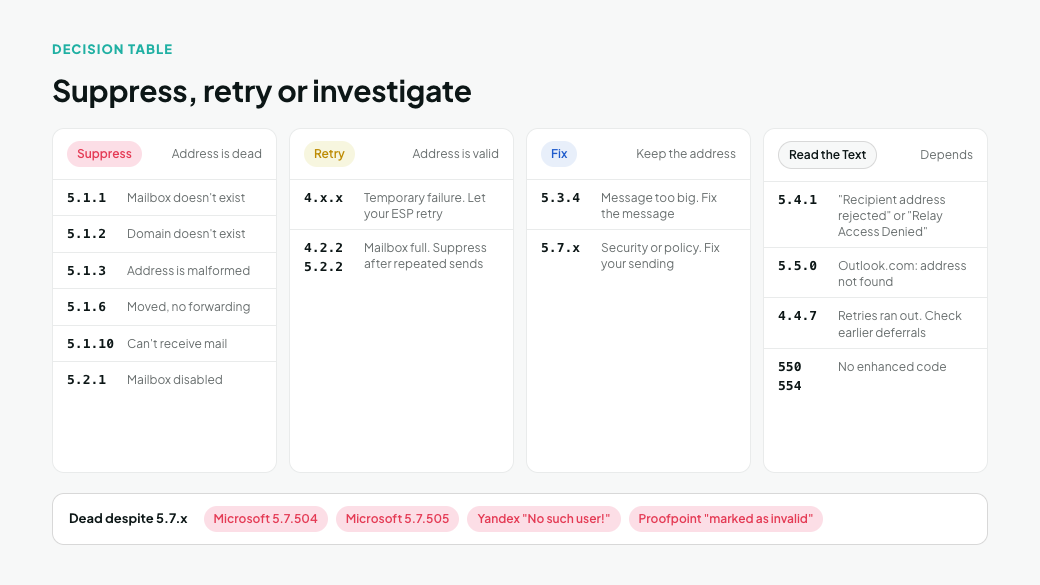
Suppress 5.1.x addresses and disabled mailboxes, retry 4.x.x, fix the message for 5.3.x, and fix your sending for most 5.7.x. This table covers any provider, including the ones not listed above. Always confirm with the response text.
Enhanced code | Standard meaning | What it says about the address | Action |
|---|---|---|---|
5.1.1 | Bad destination mailbox address | Mailbox doesn't exist | Suppress. Exception: iCloud's "inactive email address" |
5.1.2 | Bad destination system address | Domain doesn't exist or can't be found | Fix obvious typos (gmial.com), otherwise suppress. Usually generated by your own ESP's server |
5.1.3 | Bad destination mailbox address syntax | Address is malformed | Fix the record, or suppress if it can't be fixed |
5.1.6 | Mailbox has moved, no forwarding address | Person has left that address | Suppress and look for a new contact |
5.1.10 | Recipient has null MX (Microsoft: recipient not found) | Can't receive mail | Suppress |
5.2.1 | Mailbox disabled | Account suspended or inactive | Suppress, unless the text says the mailbox is rate-limited. On a Google Workspace company domain, pause and suppress if it repeats |
4.2.2 or 5.2.2 | Mailbox full | Address is valid | Retry; suppress after repeated sends. Gmail's "full and inactive": suppress |
5.3.4 | Message too big | Nothing; the message is the problem | Fix the message, keep the address |
5.4.1 | No answer from host (Microsoft: see text) | Depends on the text | "Recipient address rejected": suppress. "Relay Access Denied": check the domain's MX |
5.4.4 | Unable to route | Domain has no working mail server | Check the domain; suppress if it has no MX record |
4.4.7 | Delivery time expired | Unknown; retries ran out | Read the earlier deferral codes before deciding |
5.5.0 | Other protocol status (Outlook.com: address not found) | Depends on the text | "Mailbox unavailable" from Outlook.com: suppress |
4.x.x (other) | Temporary failure | Nothing yet | Let your ESP retry |
5.7.x | Security or policy | Usually nothing; the provider refused you | Don't suppress. Fix your sending. Exceptions: Microsoft 5.7.504 and 5.7.505, Yandex "No such user!", Proofpoint "marked as invalid" |
550, no enhanced code | Mailbox unavailable | Depends on the text | Read it. "Mailbox unavailable" or "invalid mailbox": suppress if it repeats. "Blocked" or "policy": fix your sending |
554, no enhanced code | Transaction failed | Depends on the text | Read it. Yahoo's "dd This user doesn't have…": suppress |
For the 5.7.x codes and how to fix them, see Hard Bounces vs. Spam Complaints (and Block Bounces). Standard meanings follow RFC 3463 and RFC 7505.
Checking a single bounced address
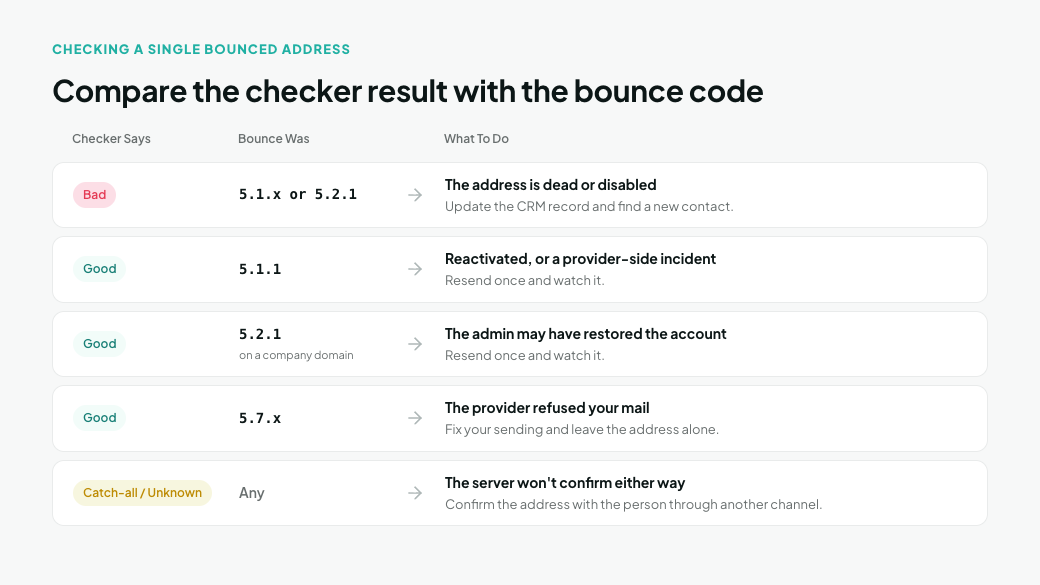
When one important address bounces, such as a key account or an active customer, check it before you suppress it. It takes two minutes:
- Copy the full response from your ESP's bounce log, not just its "hard bounce" label.
- Match it to the tables above. A 5.7.x code usually means the address is fine and your sending needs attention, unless the text says the user doesn't exist.
- Look for typos. Check for a misspelled domain (gmial.com, outlok.com), a stray space or a trailing period.
- Run the address through MillionVerifier's free Email Checker. It checks the address with the receiving mail server without sending a message.
- Compare the two answers:
- The checker says bad and the bounce was 5.1.x or 5.2.1: the address is dead or disabled. Update the CRM record and find a new contact.
- The checker says good but the bounce was 5.1.1: the address may have been reactivated, or the bounce came from a provider-side incident. Resend once and watch it.
- The checker says good but the bounce was 5.2.1 on a company domain: the admin may have restored the account. Resend once and watch it.
- The checker says good and the bounce was 5.7.x: the provider refused your mail. Fix your sending and leave the address alone.
- The checker returns catch-all or unknown: the server won't confirm either way. Confirm the address with the person through another channel.
Prevent invalid-address bounces before you send
Most addresses that would return 5.1.1 or 5.2.1 can be found before you send, because a verifier asks the receiving server the same question your send would. It matters beyond the bounce itself: Yahoo, for example, treats a server that sends to many unknown recipients as a possible open relay and stops accepting its mail.
Verify any list you haven't mailed recently, anything imported from an event, partner, CRM migration or lead source, and every cold outbound list. Do it as close to send time as you can, since mailboxes keep getting disabled.
- Export the segment from your ESP or CRM, or connect it through one of the 40+ integrations.
- Run it through the Bulk Email Verifier.
- Send to Good results.
- Send to Risky results (catch-all and unknown) separately, in small batches that you watch closely.
- Remove Bad results and add them to your ESP's suppression list, so they can't be re-imported.
- Keep new signups clean with the real-time verification API, and re-verify existing lists before each large send.
Catch typo domains at signup, not after the bounce. Many common misspellings of popular domains are registered by third parties and set up to accept mail, so a message to a typo like gmial.com may never bounce at all. It just goes to someone else. A "did you mean gmail.com?" prompt on your signup form catches most of these, and real-time verification flags domains that accept every address as risky rather than good.
Verification finds dead addresses. It can't predict policy blocks, full mailboxes or oversized messages, because those depend on your message, your reputation or the recipient's storage on the day you send. That's why the bounce log still needs reading after every send.
Frequently asked questions
What does 550 5.1.1 mean?
The receiving server says the mailbox doesn't exist. It's a permanent failure about the address itself, so suppress it. The one common exception is iCloud's "inactive email address", which the user can reactivate.
Is every 550 a hard bounce?
No. A 550 can mean a dead mailbox or a policy block. Read the enhanced code: 5.1.x means the address is dead, and 5.7.x usually means the provider refused your mail. A few providers, including Microsoft, Yandex and Proofpoint, also use 5.7.x for an address that doesn't exist, so read the text too.
Should I suppress an address after one hard bounce?
Yes, if the response clearly says the mailbox doesn't exist: Gmail and iCloud's "user does not exist", Microsoft's 5.5.0, 5.1.10, or 5.4.1 with "Recipient address rejected", and Yahoo's "dd" bounce. Yahoo explicitly tells senders to remove those addresses. For anything else, read the response text first.
Is 554 a hard bounce?
It's a permanent failure, but not always an address problem. Yahoo uses 554 for accounts that don't exist, while other servers use it for spam or policy rejections. The response text tells you which.
Why did a verified address hard bounce?
Usually for one of four reasons. The mailbox was deleted between verification and send. The domain is catch-all, so the server never confirmed the mailbox. The provider only checks recipients after the message is sent, as Yahoo does. Or the bounce was really a policy block with a 5.7.x code.
Find dead addresses before your ESP does
Most 5.1.1 bounces in your log are addresses you could have removed before sending. Run your next list through MillionVerifier, and the bounces that remain will point to problems you can fix, not data you should have cleaned.
Create your free account to get 100 free credits, no credit card needed.
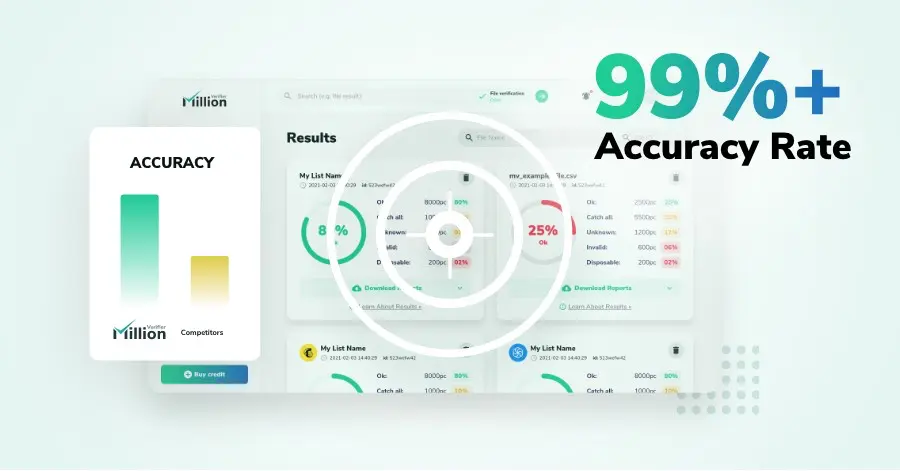
We have kept improving our email verification software for over six years now, and we are incredibly proud of our outstanding 99%+ email verification accuracy.

We have created MillionVerifier to provide the best email verification service possible for email marketers with higher email verification needs.

Our customers love what we do. We work hard to deliver the best results and user experience for our customers.