Verify Every Email in Your Clay Tables with MillionVerifier
Add a MillionVerifier column to any Clay table and know which emails are safe to send before a single one leaves Clay. Built for list builders, email waterfalls, and outbound teams that can't afford bounces.
The MillionVerifier Clay integration is a native Clay action, Validate Emails with MillionVerifier, that checks the email address in each row of a Clay table and returns its validity status. You connect your own MillionVerifier account, add the action as a column, and use the result to filter, route, or retry rows before you push them to a sequencer or CRM. It's available on Clay's Growth plan and above.
At a glance | |
|---|---|
Clay action | Validate Emails with MillionVerifier |
Input and output | Email address in, email validity status out |
Account | Your own MillionVerifier account and API key |
Clay plan | Growth and above |
Cost per check | 1 Clay Action and 1 MillionVerifier credit, with no Clay Data Credits |
In Clay since | April 23, 2026 |
Best for | Outbound list building, email waterfalls, inbound lead checks, CRM hygiene |
99%+ accuracy · Catch-all and unknown credits refunded by default
How MillionVerifier works inside a Clay table
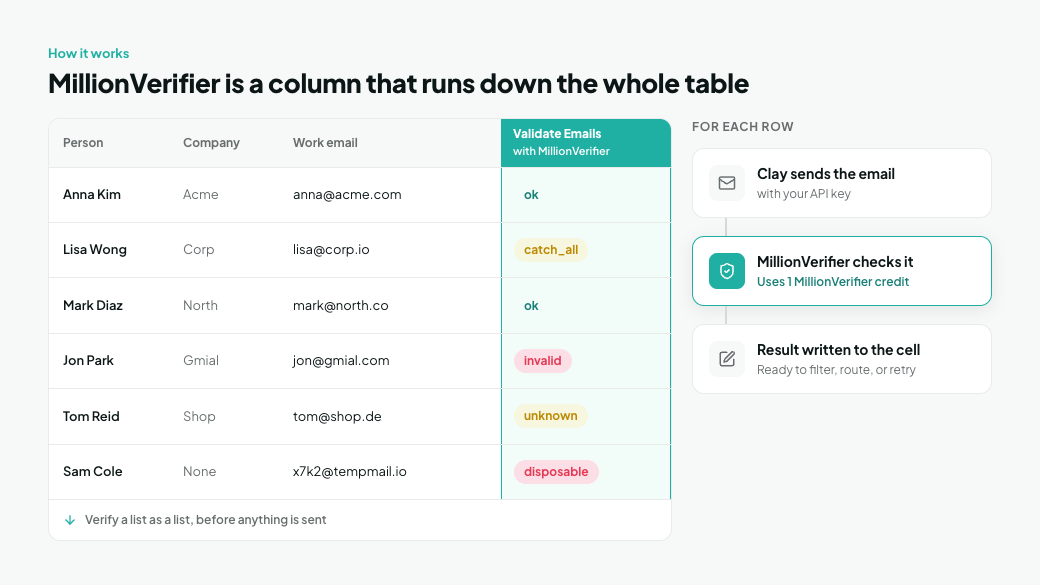
Clay organizes everything in tables. Each row is a person or a company, and each column either holds data or runs an enrichment. The MillionVerifier action is one of those enrichment columns: when it runs, Clay sends the row's email address to MillionVerifier with your API key and writes the verification result back into the cell.
Because it's a column, it runs down the whole table. You verify a list as a list, before anything is sent, rather than contact by contact while a campaign is already running.
New to Clay? Clay is a go-to-market data platform for building and enriching prospect lists. It gives you access to 200+ data providers, combines them in waterfalls so a second provider fills the gaps the first one missed, and runs AI research with Claygent. Finished rows go to a CRM, an outbound tool, or Clay's own sequencer.
What the column returns, and what to do with each row
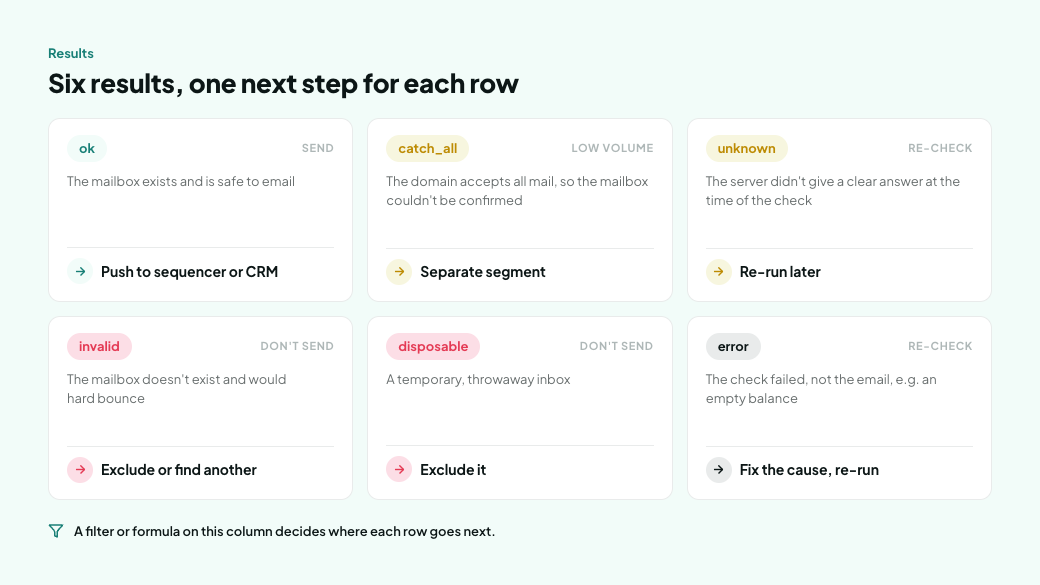
Result | What it means | What to do with the row in Clay |
|---|---|---|
ok | The mailbox exists and is safe to email | Keep it and push it to your sequencer or CRM |
catch_all | The domain accepts all mail, so the mailbox couldn't be confirmed | Move it to a separate segment and send at low volume |
unknown | The server didn't give a clear answer at the time of the check | Re-run the column on these rows later |
invalid | The mailbox doesn't exist and would hard bounce | Exclude it, or look for another address for the same person |
disposable | A temporary, throwaway inbox | Exclude it |
error | The check failed, not the email, for example because of an empty balance or an invalid API key | Fix the cause, then re-run the failed rows |
A filter or formula on this column decides where each row goes next. Most teams keep one view for sendable rows and one for everything else.
Where verification belongs in a Clay workflow
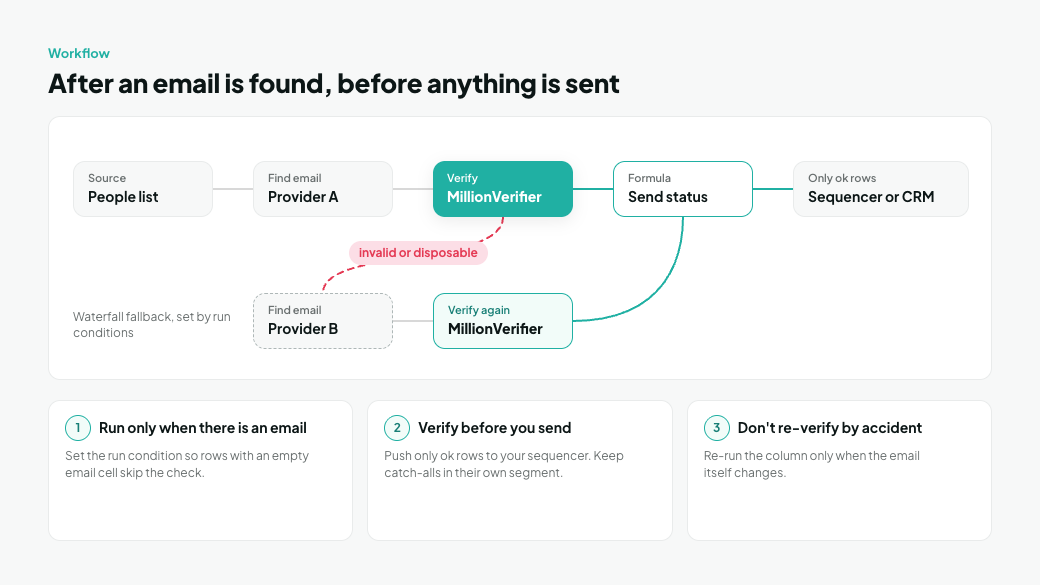
Verification goes after an email is found and before anything is sent. In a Clay table, that means the MillionVerifier column sits right after your email-finding columns, and every export, CRM sync, or sequencer push reads from it.
In a waterfall like the one in playbook 2, an invalid or disposable result sends the row on to the next email provider, so one bad address doesn't cost you the lead. Clay doesn't do this on its own; it happens because of the run conditions you set.
Three rules keep the column accurate and cheap:
- Run it only when there's something to check. Set the column's run condition so it only runs when the email cell isn't empty. Rows without an email then skip the check entirely.
- Verify before you send, not after. Push only rows marked ok to your sequencer, and keep catch-alls in their own segment with lower sending volume.
- Don't re-verify by accident. If your table re-runs columns automatically, make sure the MillionVerifier column only runs again when the email itself changes. Planned re-checks are different: re-running unknown results, or refreshing old contacts as in playbook 5, is worth doing. Unplanned re-runs just use another Clay Action and another MillionVerifier credit each time.
6 Clay playbooks with MillionVerifier
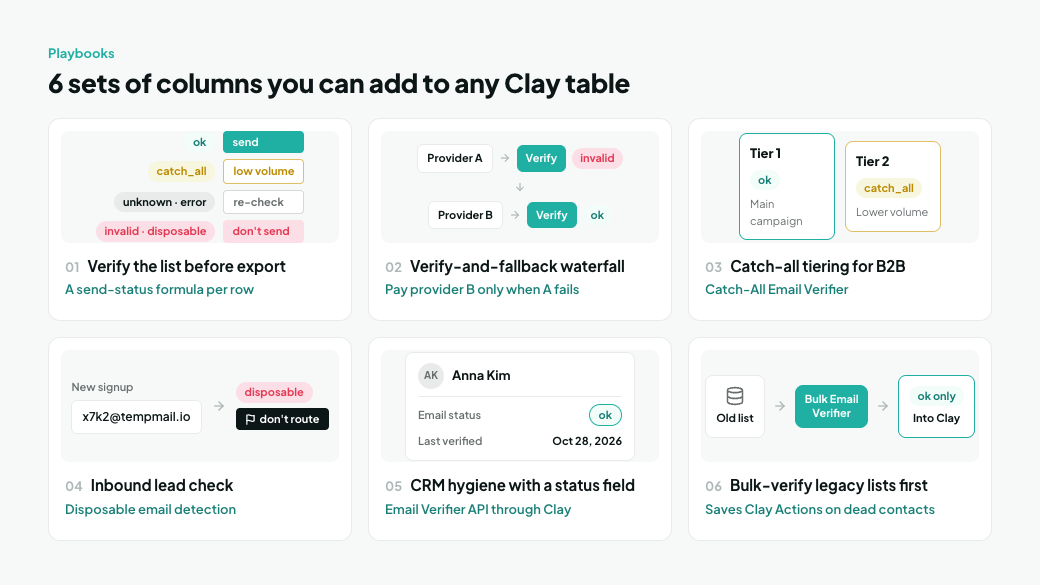
Each playbook is a set of columns you add to a Clay table, and you can combine several in the same table. They draw on different MillionVerifier features, from single-email checks inside a waterfall to bulk verification before data ever reaches Clay.
Playbook | Best for | MillionVerifier feature |
|---|---|---|
1. Verify the whole outbound list before export | SDR teams and agencies building cold email lists | Email verification across the whole table |
2. Verify-and-fallback email waterfall | Teams that want maximum coverage without paying twice | Single email verification per row |
3. Catch-all tiering for B2B lists | Teams selling to companies on catch-all domains | |
4. Inbound lead check | Marketing and RevOps routing form fills and signups | |
5. CRM hygiene with a status field | RevOps teams keeping contact data clean | Email Verifier API through Clay |
6. Bulk-verify legacy lists before enrichment | Teams with very large, old contact databases |
1. Verify the whole outbound list before export
Goal: Send cold email only to addresses that exist, so bounces never get the chance to hurt your domain.
Columns:
- Source: Import people from a CSV, a Clay people search, or a CRM list.
- Find work email: Use your email provider of choice or Clay's waterfall.
- Validate Emails with MillionVerifier: Run only when the email cell isn't empty.
- Send status (formula): ok becomes "send," catch_all becomes "low volume," unknown and error become "re-check," and invalid and disposable become "don't send."
- Push to your sequencer: Send "send" rows to Instantly, Smartlead, lemlist, or Clay's own sequencer, and "low volume" rows to a separate, lower-volume campaign. Keep "re-check" rows in their own view and re-run the column on them the next day.
Why it works: The whole list is verified before the campaign starts, which is how cold email lists should be handled. Nothing is checked halfway through a sequence, after the damage is done.
2. Verify-and-fallback email waterfall
Goal: Find a deliverable email for as many rows as possible, and only pay a second provider when the first one fails.
Columns:
- Find email with provider A.
- Validate with MillionVerifier.
- Find email with provider B: Run only if provider A found nothing, or if MillionVerifier marked A's email invalid or disposable. Catch_all and unknown results don't trigger provider B. Catch-all is a property of the whole domain, so B's address at the same company would almost always come back catch_all too, and unknown results go to re-check instead.
- Validate with MillionVerifier again: Run only when provider B's email is different from A's, so you don't pay to re-check an address you already know is bad.
- Final email and Final status (formulas): Take the first email marked ok. If there isn't one, take the first email marked catch_all. Write its result to Final status, so your send-status formula can tell sendable rows from low-volume ones. Rows with neither stay empty, and rows whose best result is unknown go to your re-check view.
Why it works: Waterfalls improve coverage, but an unverified waterfall just finds more addresses, not more deliverable ones. Putting MillionVerifier between providers means the final email column never holds an address that failed verification, and catch-all leads are kept and labeled instead of lost.
3. Catch-all tiering for B2B lists
Goal: Keep catch-all leads instead of deleting them, without letting them drag down your main campaign.
Columns:
- Validate Emails with MillionVerifier.
- Send tier (formula): ok becomes Tier 1, catch_all becomes Tier 2, unknown and error become "re-check," and invalid and disposable are excluded.
- Push by tier: Tier 1 goes to your main campaign. Tier 2 goes to a separate, lower-volume campaign or sending domain.
Why it works: MillionVerifier's Catch-All Email Verifier is built into every check, so many catch-all addresses come back as a clear ok or invalid. The ones that stay catch_all are tagged, so you decide how much risk to take rather than throwing the leads away.
4. Inbound lead check
Goal: Stop fake, mistyped, and throwaway addresses before they reach your CRM or your sales team.
Columns:
- Webhook source: Send form fills or product signups into a Clay table as they arrive.
- Validate Emails with MillionVerifier.
- Route flag (formula): Mark disposable and invalid results as "don't route."
- Push and alert: Send ok leads to HubSpot or Salesforce and notify sales. Flagged leads go to a review view instead.
Why it works: Disposable inboxes are flagged as their own result, so low-quality signups never get assigned to a rep or enrolled in a nurture flow.
5. CRM hygiene with a status field
Goal: Give every CRM contact a visible email status that sales and marketing can filter on.
Columns:
- Import contacts from HubSpot or Salesforce, one segment at a time, such as contacts whose Last verified date is empty or more than 90 days old.
- Validate Emails with MillionVerifier.
- Update the CRM record: Write the result to a custom "Email status" field and the date to a "Last verified" field, so the next refresh knows which contacts are due.
- Optional repair: For invalid rows, run a find-email column to look for a new address, then validate it.
Why it works: Verification becomes part of the record itself, so reps stop working dead contacts and marketing can exclude them from sends.
6. Bulk-verify legacy lists before enrichment
Goal: Avoid spending Clay Actions on contacts that are already dead.
Steps:
- Upload the old list to MillionVerifier's Bulk Email Verifier.
- Download the clean segment, either ok results only or ok plus catch-all.
- Import only that file into Clay for enrichment, research, and personalization.
Why it works: Every row verified inside Clay uses a Clay Action, and Clay plans limit how many rows a table can hold. Cleaning a very large database in bulk first means Clay only works on contacts worth enriching.
How to add MillionVerifier to a Clay table
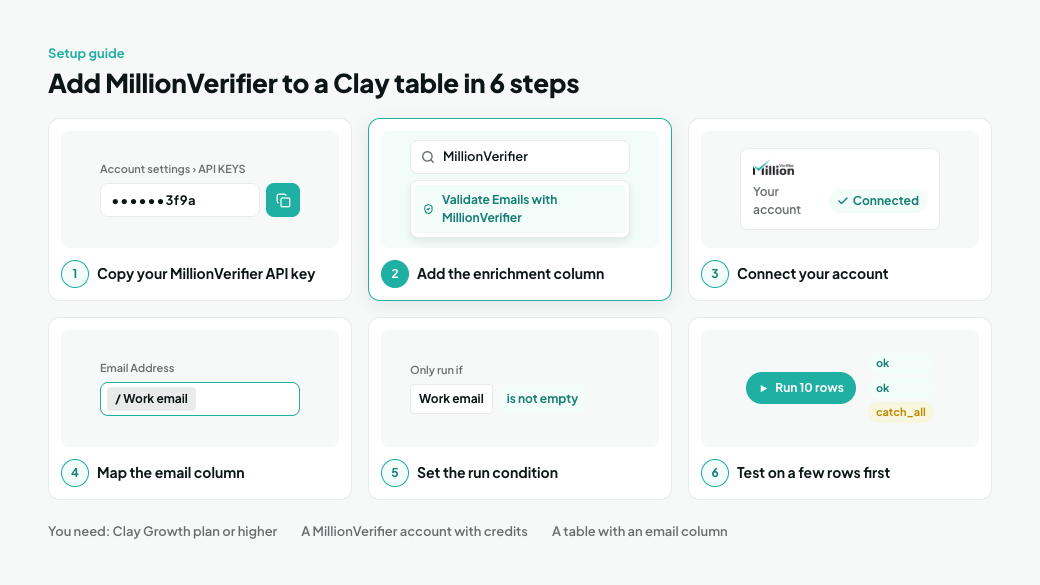
You need a Clay workspace on the Growth plan or higher, a MillionVerifier account with credits, and a table with an email column.
- Copy your MillionVerifier API key. In MillionVerifier, click your profile icon, open Account settings, and select API KEYS.
- Add the enrichment. In your Clay table, add an enrichment column, search for MillionVerifier, and choose Validate Emails with MillionVerifier.
- Connect your account. Paste your API key when Clay asks for it. The action requires your own MillionVerifier account, so verifications use your MillionVerifier credits.
- Map the email. Point the action's Email Address input at the column that holds each row's email.
- Set the run condition. Make the column run only when the email cell isn't empty. In a waterfall, also add the condition from playbook 2.
- Test on a few rows first. Run the column on 10 rows, check the results, then run it on the rest of the table.
From there, build on the result: a formula column for send status, a filtered view for sendable rows, or a push to your sequencer or CRM.
Tip: Testing on 10 rows takes a minute and costs about 10 Clay Actions and up to 10 MillionVerifier credits. Finding a wrong mapping after the column has run on 20,000 rows costs much more.
What a verification costs in Clay
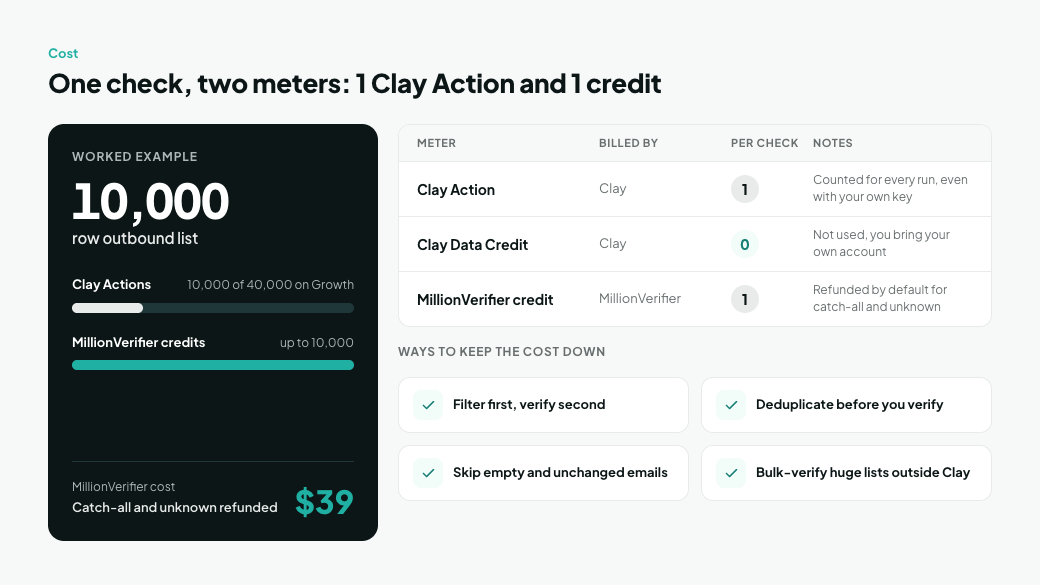
Why MillionVerifier for Clay users: When you bring your own key, every validation provider in Clay costs the same single Action per check. The real difference is the provider's own price and how many rows get a usable answer. MillionVerifier costs less than half a cent per check ($39 for 10,000 credits) and, by default, refunds the credit on catch-all and unknown results. Its built-in catch-all resolution also turns more risky rows into a clear ok or invalid, which gives your waterfall and send-status formulas a definite answer to act on.
Since March 2026, Clay bills with two meters: Data Credits for data that Clay buys on your behalf, and Actions for the work Clay performs. Because the MillionVerifier action uses your own account, each verification draws on Clay Actions and MillionVerifier credits, but not on Clay Data Credits.
Meter | Billed by | Per verification | Notes |
|---|---|---|---|
Clay Action | Clay | 1 | Counted for every run, even with your own API key |
Clay Data Credit | Clay | 0 | Not used, because you bring your own MillionVerifier account |
MillionVerifier credit | MillionVerifier | 1 | Refunded by default for catch-all and unknown results |
Worked example: Verifying a 10,000-row outbound list uses 10,000 Clay Actions, a quarter of the 40,000 included in Clay's Growth plan each month. On the MillionVerifier side, it uses up to 10,000 credits, which cost $39, and credits for catch-all and unknown results are refunded.
Ways to keep the cost down:
- Filter first, verify second. Apply your ICP filters before the MillionVerifier column, so you only verify people you'll actually contact.
- Deduplicate before you verify. The same email in two rows costs two Actions and two credits.
- Skip empty and unchanged emails. Use the run condition from the setup steps, and don't let the column re-run when the email hasn't changed.
- Bulk-verify very large legacy lists outside Clay. Playbook 6 saves Clay Actions on contacts that turn out to be dead.
Frequently asked questions
Does MillionVerifier integrate with Clay?
Yes. MillionVerifier is a native Clay action called Validate Emails with MillionVerifier, listed in Clay's integrations since April 23, 2026, under Contact Data Verification. It takes an email address and returns an email validity status.
Which Clay plan do I need for the MillionVerifier integration?
Clay's Growth plan or higher. The action isn't available on Clay's Free or Launch plans.
Do I need my own MillionVerifier account to use it in Clay?
Yes. The action requires your own MillionVerifier account. You connect it with your API key, and each verification uses your MillionVerifier credits rather than Clay Data Credits.
How much does it cost to verify an email in Clay with MillionVerifier?
Each verification uses one Clay Action and one MillionVerifier credit. By default, MillionVerifier refunds the credit for catch-all and unknown results, so you only pay for ok, invalid, and disposable results. On the MillionVerifier side, 10,000 credits cost $39.
Can I use MillionVerifier inside a Clay waterfall?
Yes. Add a MillionVerifier column after each email provider and set the next provider to run only when the previous email is missing, invalid, or disposable. A final formula picks the first email marked ok and falls back to a catch_all address, so the final column never holds an address that failed verification.
Should I verify cold email lists in Clay or with MillionVerifier's Bulk Email Verifier?
It depends on where the list comes from. Lists you build and enrich in Clay are best verified there, before export. Very large existing databases are cheaper to clean with the Bulk Email Verifier first, then import the clean file into Clay.
How does MillionVerifier handle catch-all emails in Clay?
Catch-all resolution is built into every MillionVerifier check. It resolves 30% to 40% of catch-all addresses into clear valid or invalid results. The rest return as catch_all, and you can send them to a separate, lower-volume campaign.
Can Clay verify inbound leads as they arrive?
Yes. Send form fills or signups into a Clay table through a webhook, and the MillionVerifier column checks each new row as it lands. Disposable and invalid addresses can be flagged before they reach your CRM.
Why did some rows return "error"?
An error means the check failed, not the email. The most common causes are an empty MillionVerifier balance and an invalid or expired API key. Fix the cause, then re-run the column on the failed rows only.
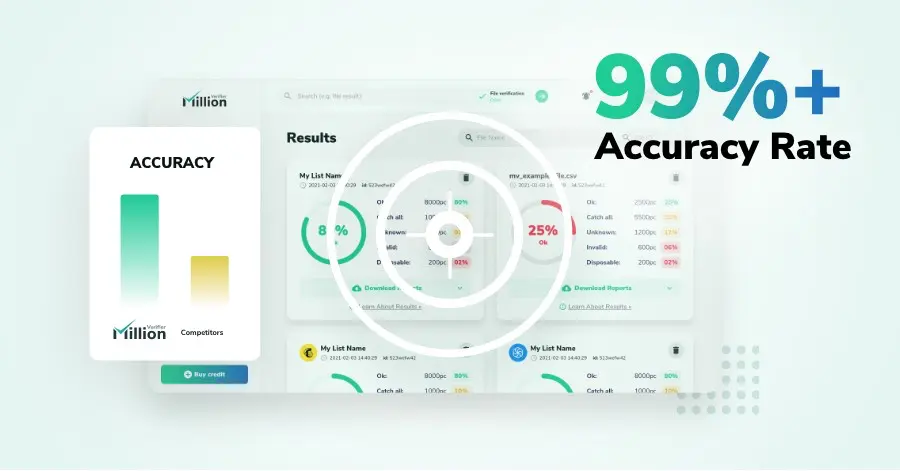
We have kept improving our email verification software for over six years now, and we are incredibly proud of our outstanding 99%+ email verification accuracy.
We have created MillionVerifier to provide the best email verification service possible for email marketers with higher email verification needs.
Our customers love what we do. We work hard to deliver the best results and user experience for our customers.