Automate Real-Time and Bulk Email Verification with MillionVerifier and Make
Add MillionVerifier to any Make scenario to verify single emails in real time, run bulk list checks on a schedule, and keep an eye on your credit balance, all on Make's visual canvas and without writing code.
The MillionVerifier Make integration is a verified app that brings MillionVerifier's email verification into Make scenarios. It offers nine modules: verify a single email, upload a file for bulk verification, track and download bulk results, manage uploaded files, check your credit balance, and make custom API calls. Combined with Make's routers, filters, and 3,500+ apps, it keeps bad addresses out of your CRM, lists, and outreach tools.
Key takeaways
- What it does: Nine MillionVerifier modules for Make, covering single verification, bulk file verification, file management, and credit checks.
- Works with: 3,500+ Make apps, including HubSpot CRM, Salesforce, Google Sheets, Airtable, Facebook Lead Ads, Tally, Brevo, Shopify, and Slack.
- Best for: Real-time checks on new signups and leads, plus bulk checks of cold email lists and scheduled audits of lists stored in Google Sheets, Airtable, or your CRM.
- Bulk verification built in: Make can upload a list, wait for the job to finish, and download the clean results with native modules. No webhooks or code needed.
- Setup: No code. You need a MillionVerifier API key and a Make account.
- Vendor-maintained: Make lists MillionVerifier as a Verified app, supported and maintained by the official vendor.
Connect MillionVerifier to Make
99%+ accuracy · Credits never expire · Catch-all and unknown credits refunded by default
What is the MillionVerifier Make integration?
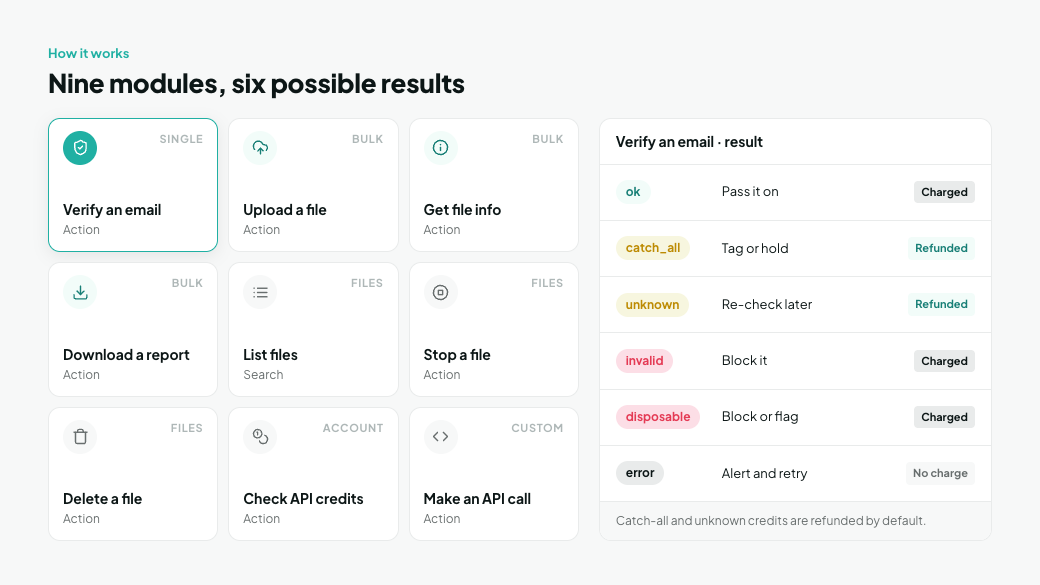
The MillionVerifier Make integration is a no-code app that adds email verification to Make scenarios. It covers both of MillionVerifier's verification methods: real-time checks of single emails, and bulk verification of whole lists uploaded as files.
The app includes nine modules. All of them are actions or searches, so another app or a schedule starts the scenario, and MillionVerifier does its work inside it.
Module | Type | What it does | Use it for |
|---|---|---|---|
Verify an email | Action | Verifies a single email address in real time | Form signups, new leads, CRM contacts |
Upload a file | Action | Uploads a file of emails for bulk verification | Scheduled list audits, big imports |
Get file info | Action | Returns the status and details of an uploaded file | Checking whether a bulk job is finished |
Download a report | Action | Downloads the results of a bulk verification file | Getting the clean list back into your tools |
List files | Search | Returns the files you've uploaded | Finding past or running bulk jobs |
Stop a file | Action | Stops a file that's still being processed | Cancelling a job started by mistake |
Delete a file | Action | Permanently deletes an uploaded file | Data hygiene once results are saved |
Check API credits | Action | Returns your available credits | Low-balance alerts before scenarios fail |
Make an API call | Action | Sends any authorized request to the MillionVerifier API | Endpoints or options the other modules don't cover |
A typical real-time scenario runs in four steps:
- Trigger: A new record appears in another app, such as a Tally form response, a Facebook Lead Ads lead, or a new HubSpot contact.
- Verify: The Verify an email module checks the address from that record.
- Route: A Router splits the scenario into routes, and a filter on each route reads the verification result.
- Act: Good emails continue to your CRM, list, or sequence. Risky ones are tagged or held. Bad ones are blocked or logged.
Every check returns one of six results. Five describe the email and fall into three quality levels. The sixth, error, means the check itself didn't complete.
Result | Quality | What it means | What your scenario should do | Credit charged? |
|---|---|---|---|---|
ok | Good | The mailbox exists and is safe to email | Pass it on to your CRM, list, or sequence | Yes |
catch_all | Risky | The domain accepts all mail, so the mailbox couldn't be confirmed | Tag it and send carefully, or hold it | Refunded by default |
unknown | Risky | The server didn't give a clear answer at the time of the check | Hold it and re-check later | Refunded by default |
invalid | Bad | The mailbox doesn't exist and would hard bounce | Block it or delete it | Yes |
disposable | Bad | A temporary, throwaway inbox | Block it or flag it as low quality | Yes |
error | None | The check failed, not the email. Causes include no credits left, an invalid API key, a blocked IP, a missing email, or an internal error | Send yourself an alert and retry once the cause is fixed | No |
Plan for errors. A filter that only passes ok quietly drops a lead that returns error. Make catches errors in two different ways, and a reliable scenario uses both:
- A fallback route on the Router catches errors that come back as a result value. The module ran, but the check didn't complete.
- A Break error handler on the Verify an email module catches failures of the module itself, such as an HTTP error or a timeout. It only retries if Allow storing of incomplete executions is turned on in the scenario settings. Even when every retry fails, the stored execution keeps the lead's data, so nothing is lost.
Retries can't fix an empty balance. Running out of credits is one of the most likely causes of errors, so pair both mechanisms with auto top-up and the Check API credits module.
What is Make?
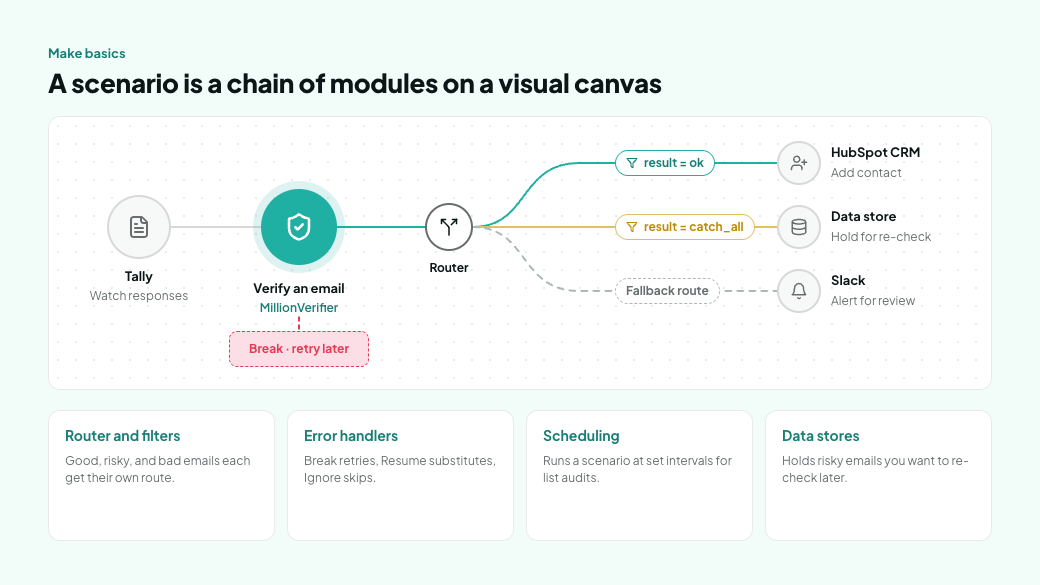
Make (formerly Integromat) is a visual automation platform that connects more than 3,500 apps. You build workflows on a drag-and-drop canvas and can see exactly how data moves from one app to the next.
Make workflows are called scenarios. Each scenario is a chain of modules, and each module performs one action in an app, such as creating a contact or verifying an email. Mapping passes data from one module to the next, for example the email address from a form into MillionVerifier. Make's AI assistant, Maia, can also draft scenarios from a written prompt.
For email verification, these Make tools matter most:
- Router and filters split one scenario into several routes, so good, risky, and bad emails each get their own next step. A fallback route catches anything no other route matches.
- Error handlers decide what happens when a module fails. Break retries the module later, Resume continues with a substitute value, and Ignore skips the failed bundle.
- Scheduling runs a scenario at set intervals, which suits regular bulk list audits.
- Data stores keep records inside Make, which works as a holding area for risky emails you want to re-check later.
Which Make plan do you need? Make bills in credits, and most modules use one credit each time they run. The free plan is enough to build and test a verification scenario. Teams that verify several lead sources or audit large lists need a paid plan, which removes the limit on active scenarios and allows more frequent scheduling.
6 problems you can solve with Make and MillionVerifier
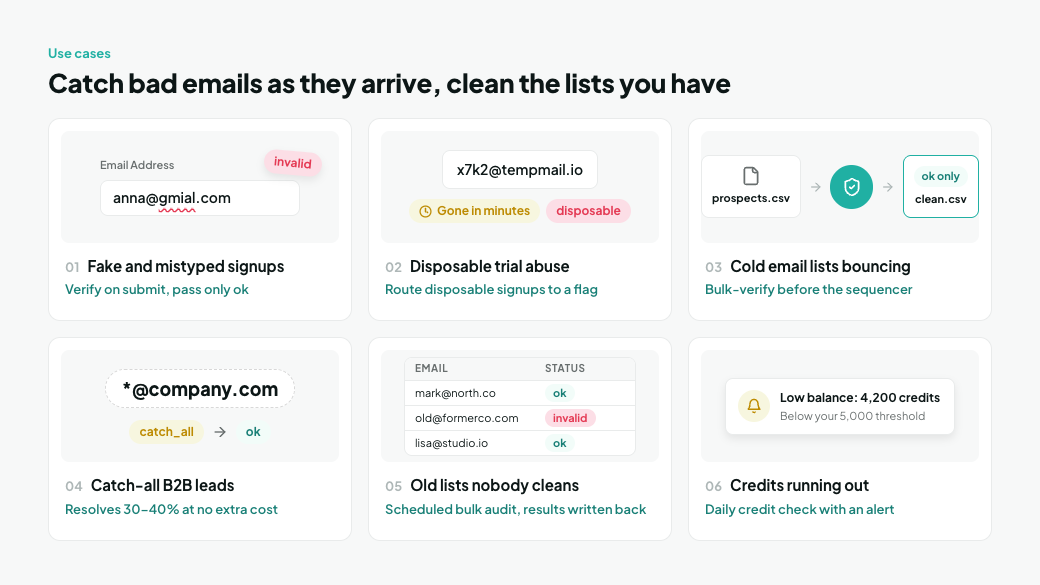
Make and MillionVerifier together catch bad email addresses as they arrive and clean the lists you already have. Because the Make app includes bulk and credit modules, a single platform covers both real-time and scheduled verification.
Problem | MillionVerifier feature | Scenario in one line |
|---|---|---|
Fake and mistyped form signups | Form → Verify an email → Router → Email list or CRM | |
Disposable emails abusing trials and lead magnets | Signup → Verify an email → Router → Onboard or flag | |
Cold email lists bouncing and hurting deliverability | New list file → Upload a file → Download a report → Clean list for your sequencer | |
B2B leads stuck as "risky" catch-alls | Lead → Verify an email → Router → Send, hold, or re-check | |
Old lists in Google Sheets, Airtable, or a CRM | Schedule → Upload a file → Get file info → Download a report | |
Scenarios failing when credits run out | Email Verifier API credit check | Schedule → Check API credits → Filter → Alert |
1. Fake and mistyped emails from your signup forms
The problem: Website forms collect typos like gmial.com, made-up addresses, and bot submissions. Each one inflates your list, wastes sends, and adds to your bounce rate.
The solution: Verify each address as soon as the form is submitted. The Verify an email module checks one address in real time, and only addresses marked ok continue to your email platform.
Scenario recipe: Tally, Google Forms, or Facebook Lead Ads (watch new responses) → MillionVerifier: Verify an email → Router:
- Route 1 (filter: result is ok): Brevo, Mailchimp, or HubSpot CRM: add or update the contact.
- Fallback route: Slack: post the address and its result so someone can review it.
Variation: Instead of filtering, write the result into a custom "Email status" field in HubSpot CRM or Salesforce, so sales and marketing can segment by data quality.
2. Disposable emails abusing free trials and lead magnets
The problem: Temporary inboxes let people grab your ebook, webinar seat, or free trial without ever becoming a real lead. Some of these inboxes disappear within minutes.
The solution: MillionVerifier flags disposable addresses as their own result. A Router lets you treat them differently from genuine signups instead of letting them slip into your nurture flows.
Scenario recipe: New signup in Shopify, WordPress, or your form tool → MillionVerifier: Verify an email → Router:
- Route 1 (ok): Start the onboarding sequence.
- Route 2 (disposable): Tag the contact as low quality and post an alert to Slack.
- Route 3 (invalid): Log it in a data store and stop.
- Fallback route (error or anything else): Send a Slack or email alert with the signup's details, so no real lead is lost while you fix the cause.
3. Cold emails bouncing and damaging sender reputation
The problem: Prospect lists go stale. People change jobs, and companies change domains. Sending to those addresses produces hard bounces, which hurt your domain reputation and can get sending accounts paused.
The solution: Verify every prospect list in bulk before it reaches your sequencer. Cold outreach lists arrive as exports of hundreds or thousands of contacts, so MillionVerifier's Bulk Email Verifier is the right tool. It checks the whole file at once, gives catch-all checks time to finish, and lets you download only the deliverable segment. The Make app runs the whole bulk job with native modules, the same ones problem 5 uses for list audits.
Scenario recipe (one scenario, run every few hours): MillionVerifier: Check API credits → Router:
- Route 1, send new lists (filter: your balance covers a typical list): Google Drive: search for files in a "To verify" folder → Google Drive: download the file → MillionVerifier: Upload a file → Google Drive: move the file to a "Sent" folder → Data store: add a record with the file ID, marked pending.
- Route 2, collect clean lists: Data store: search records marked pending → MillionVerifier: Get file info → Filter: the file is finished → MillionVerifier: Download a report with ok results → Google Drive: upload the clean CSV to a "Ready to import" folder → Slack: tell the team the list is ready for Instantly or lemlist → MillionVerifier: Delete a file → Data store: delete the record.
Tip: Import the clean CSV straight into your sequencer rather than adding leads one by one through Make, since each added lead would use a Make credit. Use ok results for your main campaign, and download ok plus catch-all only if you run a separate, lower-volume campaign for catch-all addresses.
4. Valuable B2B leads stuck as "risky" catch-all addresses
The problem: Many company domains run catch-all servers that accept mail for any address. Most verifiers can't confirm the mailbox behind them, label it risky, and leave you to choose between deleting a good lead or risking a bounce.
The solution: MillionVerifier's Catch-All Email Verifier is built into its standard verification engine. It resolves 30% to 40% of catch-all addresses into a clear valid or invalid result at no extra cost. Catch-alls that can't be resolved stay labeled catch_all.
Scenario recipe: New lead → MillionVerifier: Verify an email → Router:
- Route 1 (ok): Add to the main campaign. Catch-alls that MillionVerifier resolves as valid come back as ok and land here too.
- Route 2 (catch_all): Add to a separate low-volume campaign, or save to a data store for manual review.
- Route 3 (unknown): Save to a data store, and re-check these records the next day in a scheduled scenario.
- Fallback route (error): Send an alert to Slack or email and keep the lead in the data store until the cause, often an empty credit balance, is fixed.
Tip for catch-all-heavy lists: Catch-all resolution runs deeper checks than a standard verification, so it can take longer. If most of your leads sit on catch-all domains, verify them in bulk with the file modules in problem 5, where these checks have time to finish.
5. Old lists in Google Sheets, Airtable, or your CRM that nobody cleans
The problem: Email data decays every month. Lists that sit in a spreadsheet or CRM collect invalid addresses until a campaign bounces, and exporting, uploading, and re-importing them by hand rarely happens on schedule.
The solution: Run MillionVerifier's bulk verification on a schedule, entirely inside Make. The Upload a file, Get file info, and Download a report modules handle the whole bulk job, so you don't need webhooks or code. You can download only the segment you need, such as ok results, ok plus catch-all, or invalid addresses to remove.
Scenario recipe (one daily scenario): MillionVerifier: Check API credits → Router. Checking credits first gives the scenario a starting module that runs every day and tells the upload route whether your balance is high enough. Keeping both steps in one scenario also uses only one active scenario, which matters on the free plan's limit of two.
- Route 1, collect finished files: Data store: search records marked pending → MillionVerifier: Get file info → Filter: the file is finished → MillionVerifier: Download a report → CSV: parse the report → Array aggregator → Google Sheets: Bulk Update Rows → MillionVerifier: Delete a file → Data store: delete the record, so the next run doesn't look for a file that no longer exists.
- Route 2, send the list (filter: it's the 1st of the month and your balance covers the list): Google Sheets or Airtable: search rows → CSV: create a CSV of the emails → MillionVerifier: Upload a file → Data store: add a record with the file ID, marked pending.
What it costs in Make credits: A daily run uses about two Make credits even when no file is pending, roughly 60 a month. Checking hourly instead would use about 720 credits a month on the data store search alone, most of the free plan's 1,000. Writing results back one row at a time costs at least one Make credit per row, so a 10,000-row list would use 10,000 credits or more. Bulk modules such as Google Sheets' Bulk Update Rows write many rows in a single module run, so use them wherever the destination app has them.
You'll need a paid Make plan for large list audits. Beyond credits, the free plan caps files at 5 MB and scenario runs at 5 minutes. Very large databases may be easier to upload once in the MillionVerifier dashboard, with Make handling new records from then on.
6. Scenarios failing because your credits ran out
The problem: When your MillionVerifier balance hits zero, every verification fails. Leads stop flowing, and you might not notice until a campaign underperforms.
The solution: Check your balance automatically with the Check API credits module and get warned before it runs out. Pair it with MillionVerifier's auto top-up for a balance that never runs dry.
Scenario recipe: Schedule (daily) → MillionVerifier: Check API credits → Filter: credits are below your threshold, for example 5,000 → Slack or Gmail: send a low-balance alert. Set the threshold to cover at least a day of checks, because every check uses a credit up front, even one that's later refunded as catch-all or unknown. The bulk scenario in problem 5 runs the same check before each upload.
How to connect MillionVerifier to Make in 8 steps
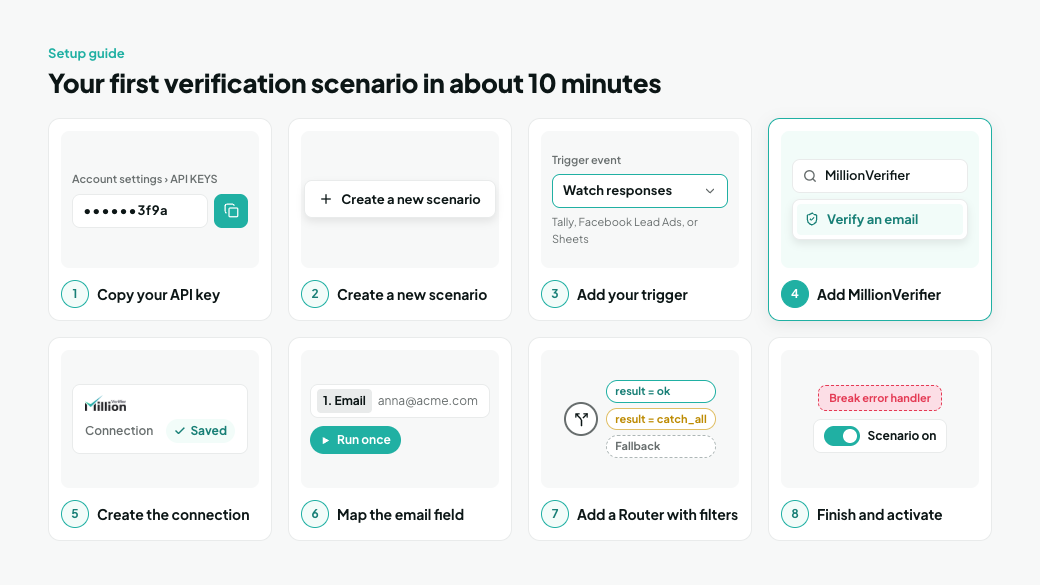
You can build your first verification scenario in about 10 minutes, with no code. You need a MillionVerifier account with credits and a Make account. The free Make plan is enough to build and test it.
- Copy your MillionVerifier API key. In MillionVerifier, click your profile icon in the top-right corner, open Account settings, select API KEYS, and copy your key.
- Create a new scenario. In Make, click Create a new scenario to open the canvas.
- Add your trigger. Choose the app where new emails arrive, such as Tally, Facebook Lead Ads, or Google Sheets, and pick the event, such as "Watch responses" or "Watch new rows."
- Add the MillionVerifier module. Click the plus icon after the trigger, search for MillionVerifier, and select Verify an email.
- Create the connection. Click Create a connection, give it a name if you like, paste your API key, and save. You only do this once.
- Map the email field. In the Verify an email module, map the email address from your trigger. Click Run once to test with a sample record and see the result.
- Add a Router with filters. Add a Router after the MillionVerifier module. Set a filter on each route, such as "result equal to ok," and mark one route as the fallback for errors and anything unexpected.
- Add your final modules and activate. Connect each route to its destination, such as your CRM, email platform, or sequencer. Right-click the Verify an email module to add a Break error handler, and turn on Allow storing of incomplete executions in the scenario settings so it can retry. Then switch the scenario on.
Tip: Make's AI assistant, Maia, can draft this scenario from a prompt such as "When someone submits my Tally form, verify their email with MillionVerifier and add only valid ones to Brevo." Review each module and filter before you activate it.
Good to know: Most modules use one Make credit each time they run, so a scenario's Make cost grows with the number of modules and runs. Put filters early, so records you don't need stop before the costlier steps.
Why use MillionVerifier inside your Make scenarios
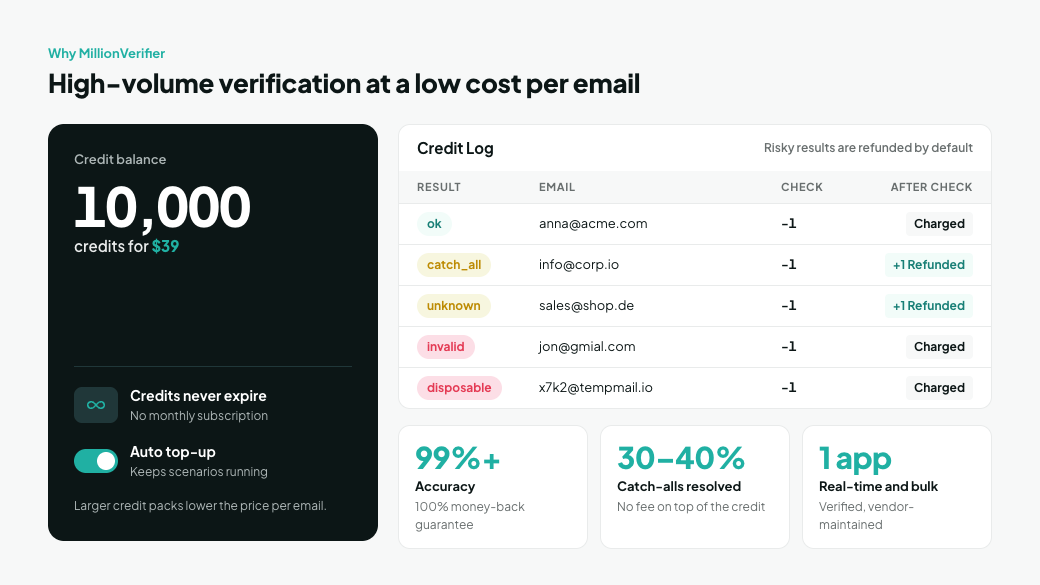
MillionVerifier is built for high-volume verification at a low cost per email, which suits scenarios that run hundreds or thousands of times a month.
- Real-time and bulk in one app. The same Make connection verifies single emails as they arrive and runs bulk jobs on whole lists, so you don't need a second tool for list cleaning.
- Maintained by the vendor. Make lists MillionVerifier as a Verified app, supported and maintained by the official vendor rather than a third party.
- 99%+ accuracy, backed by a money-back guarantee. MillionVerifier stands behind its results with a 100% money-back guarantee, not just a credit refund.
- Risky results are refunded, by default. MillionVerifier deducts one credit per check, then automatically refunds the credits for catch-all and unknown results once the check is done. You end up paying only for ok, invalid, and disposable results. See the risky email credit policy for details.
- Catch-all resolution is included. The built-in Catch-All Email Verifier turns many catch-all addresses into clear valid or invalid results, with no fee on top of the standard credit.
- Credits never expire. Buy once and use them whenever your scenarios run, with no monthly subscription to keep alive.
- Auto top-up keeps scenarios running. When your balance runs out, verification fails instead of returning a result. Turn on automatic credit purchases, and use the Check API credits module for an early warning.
- Simple, low pricing. 10,000 credits cost $39, and larger credit packs lower the price per email.
Frequently asked questions
Does MillionVerifier integrate with Make?
Yes. MillionVerifier is a Verified app on Make, supported and maintained by the official vendor. It connects MillionVerifier to more than 3,500 Make apps, including HubSpot CRM, Salesforce, Google Sheets, Airtable, and Slack.
Which MillionVerifier modules are available in Make?
There are nine: Verify an email, Upload a file, Get file info, Download a report, List files, Stop a file, Delete a file, Check API credits, and Make an API call. They're all actions or searches, so another app or a schedule starts the scenario.
Can I use the MillionVerifier integration on Make's free plan?
Yes, for building and light use. Make's free plan includes 1,000 credits a month, routers and filters, two active scenarios, and a 15-minute minimum interval for scheduled runs. Paid plans add unlimited active scenarios and one-minute scheduling, and regular bulk audits of large lists need one.
How much does it cost to verify emails with Make and MillionVerifier?
You pay for two things. On the MillionVerifier side, each check uses one credit, and by default the credits for catch-all and unknown results are refunded automatically once the check is done. You end up paying only for ok, invalid, and disposable results (details). On the Make side, most modules use one Make credit each time they run.
Can I verify an entire email list in bulk with Make?
Yes. Use Upload a file to send the list, Get file info to check when the job is finished, and Download a report to get the results back. Run it on a schedule to audit lists in Google Sheets, Airtable, or your CRM automatically.
How does the integration handle catch-all emails?
Catch-all resolution is built into MillionVerifier's standard verification. It resolves 30% to 40% of catch-all addresses into valid or invalid results. The rest return as catch_all, and you can route them with a Router. For lists that are mostly catch-all domains, bulk verification gives these deeper checks the most time to finish.
What should I do with emails that return "unknown"?
Hold them and verify again later. Unknown usually means the receiving server didn't answer clearly at that moment. Save them to a data store and re-check them in a scheduled scenario the next day. By default, the credit for the first unknown result is refunded, so you only pay if the re-check comes back with a definite result such as ok.
What does an "error" result mean?
It means the check failed, not the email. Common causes are an empty credit balance, an invalid API key, a blocked IP, or a missing email field. A fallback route catches errors that come back as a result value, while a Break error handler catches failures of the module itself, such as timeouts. Break only retries when Allow storing of incomplete executions is turned on, and no retry helps while your balance is zero, so use Check API credits and auto top-up to prevent that case.
What does an "error" result mean?
It means the check failed, not the email. Common causes are an empty credit balance, an invalid API key, a blocked IP, or a missing email field. A fallback route catches errors that come back as a result value, while a Break error handler catches failures of the module itself, such as timeouts. Break only retries when Allow storing of incomplete executions is turned on, and no retry helps while your balance is zero, so use Check API credits and auto top-up to prevent that case.
Do I need to know how to code?
No. You build the whole scenario on Make's visual canvas by adding modules, mapping the email field, and setting filters. Developers who need an endpoint the other modules don't cover can use the Make an API call module.
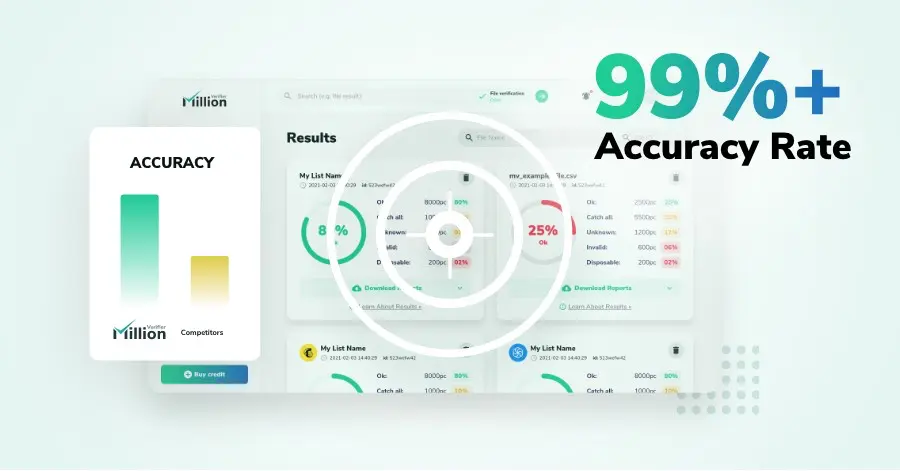
We have kept improving our email verification software for over six years now, and we are incredibly proud of our outstanding 99%+ email verification accuracy.
We have created MillionVerifier to provide the best email verification service possible for email marketers with higher email verification needs.

Our customers love what we do. We work hard to deliver the best results and user experience for our customers.