Why Are My Apollo Emails Bouncing? How to Verify Exported Leads
Apollo emails bounce mostly because contact data ages. People change jobs, companies shut down mailboxes, and an address that was verified months ago may not exist today. The fix is to verify Apollo exports right before they go into a sequence, especially if they're more than 30 days old or you're sending from another tool. Send only the addresses that come back Good, test catch-all and unknown leads in small batches, and suppress the rest.
Good, Risky and Bad are MillionVerifier's verification results. They're separate from Apollo's own email statuses, which are explained below.
- "Verified" describes the address on the day it was checked. It doesn't tell you whether the person still works there.
- Aim for under 1% hard bounces, well inside what Apollo itself calls acceptable.
- Don't sequence Unverified or Update required contacts as they are. Apollo's own statuses tell you these addresses are uncertain or out of date.
What do Apollo's email statuses mean?
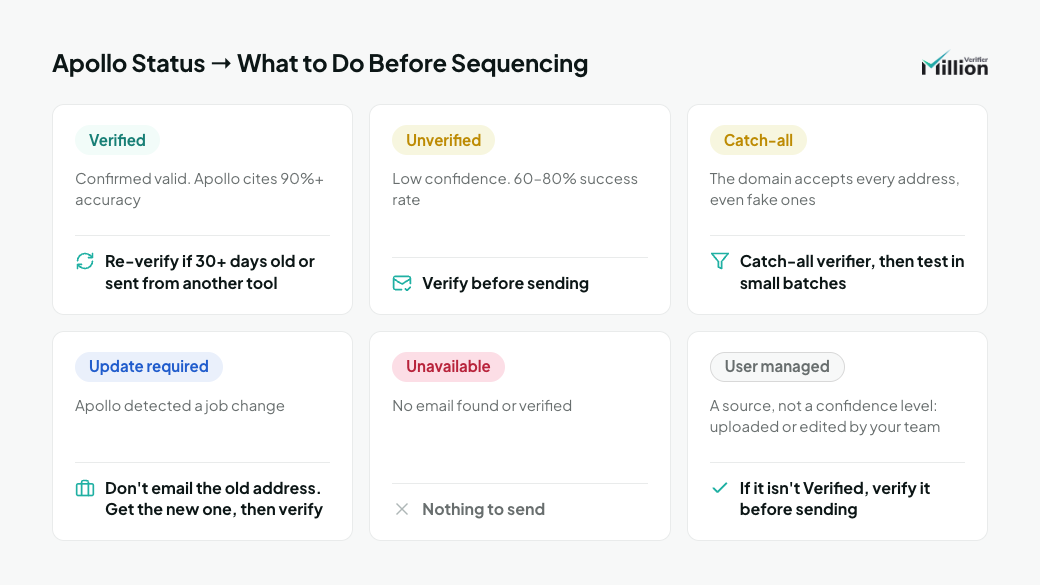
Apollo labels every address with a status that describes how confident it is in that address. Here's what each one means, according to Apollo's Email Status Overview, and what to do with it before a sequence.
Apollo status | What Apollo says it means | What to do before sequencing |
|---|---|---|
Verified | A fully confirmed, valid address. Apollo says its verified emails have an accuracy rate of more than 90% | Verify again if the export is more than 30 days old or you're sending from another tool |
Unverified | Apollo couldn't verify the address, or has low confidence in it. This includes uploaded or edited addresses that Apollo couldn't confirm | Verify before sending. Apollo won't send a first email to an Unverified address as a failsafe, and says Unverified addresses have a 60–80% success rate (Apollo's View and Respond to Emails article) |
Catch-all | The domain accepts every address, even ones that don't exist | Run them through a catch-all verifier, then test the rest in small batches |
Update required | Apollo has detected a job change | Don't email the old address. Get the new one, then verify it |
Unavailable | Apollo couldn't find or verify an email | Nothing to send |
User managed | Not a confidence level but a source: any address your team uploaded from a CRM or CSV, or edited in Apollo. It can be Verified or Unverified | Check its verification status. If it isn't Verified, verify it before sending |
The 30-day line is our recommendation. It matches Apollo's own refund window: Apollo refunds the credit if a verified email bounces within 30 days of purchase.
Why do verified Apollo emails still bounce?
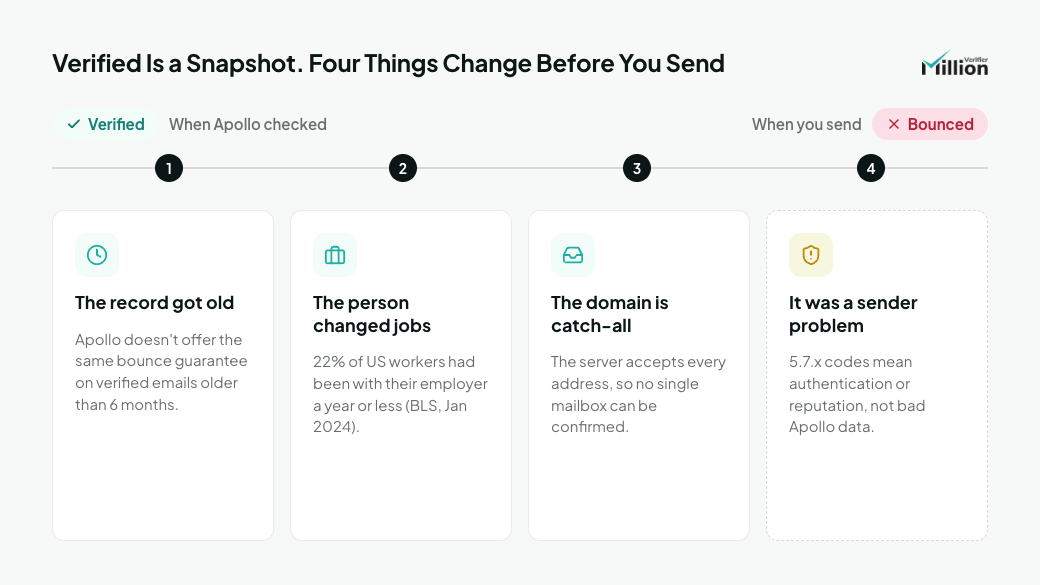
A verified status is a snapshot. Four things can change, or hide, between that check and your send.
- The record got old. Apollo says it doesn't provide the same bounce rate guarantee for verified emails it provided more than six months ago (Apollo's Troubleshoot Bounced Emails article). Exports that sit in a spreadsheet or another tool keep ageing after you download them.
- The person changed jobs. When someone leaves, their employer usually closes the mailbox. In January 2024, 22% of US wage and salary workers had been with their current employer for a year or less, and the median for workers aged 25 to 34 was 2.7 years (BLS, Employee Tenure in 2024). Apollo marks a contact Update required when it detects a job change, but it can only flag the changes it knows about.
- The domain is catch-all. A catch-all server accepts every address during a check, so it can't confirm that a specific mailbox exists. Apollo notes that mail to a wrong address on a catch-all domain often lands in an inbox nobody reads, which lowers engagement and can hurt your domain over time.
- It wasn't a bounce about the address at all. If your bounces carry 5.7.x codes, the provider refused your mail because of authentication or reputation. That's a sender problem, not an Apollo data problem. 550 5.1.1 and Other Hard Bounce Codes shows how to tell them apart.
What bounce rate should you expect from Apollo leads?
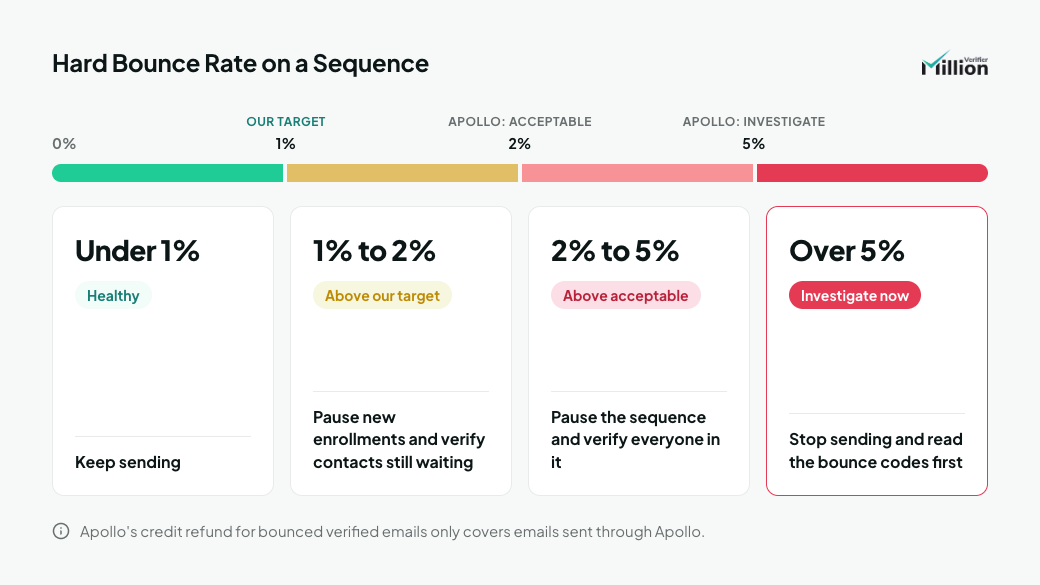
Apollo calls a bounce rate under 2% acceptable and says to investigate immediately if yours consistently exceeds 5%. On a freshly verified export, you should be well under that. Use this as your guide:
Hard bounce rate on a sequence | What it means | What to do |
|---|---|---|
Under 1% | Healthy | Keep sending |
1% to 2% | Above our target, though still inside what Apollo calls acceptable | Pause new enrollments and verify the contacts still waiting to be emailed |
2% to 5% | Above what Apollo calls acceptable | Pause the sequence and verify everyone in it |
Consistently above 5% | Apollo says to investigate immediately | Stop sending and read the bounce codes before anything else |
Apollo removes hard-bounced addresses on its own, and a bounce can make it auto-pause an entire sequence until you clean it up.
One more reason to keep bounces low inside Apollo: its credit refund for bounced verified emails only covers emails sent through Apollo, according to its How Do Data Requests Work article. If you export leads and send them from another tool, a bounce costs you the credit as well as the reputation.
How do you verify Apollo leads before a sequence?
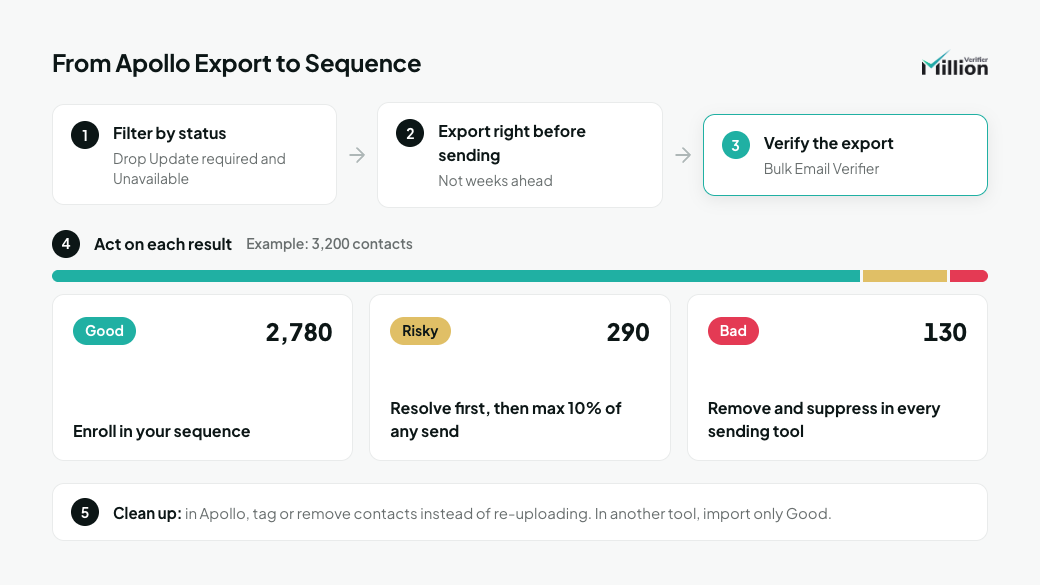
Filter in Apollo, export right before you send, verify the export, and enroll only the Good results. Step by step:
- Filter by email status in Apollo. Keep Verified contacts. Include Catch-all and Unverified contacts, and User managed addresses that aren't Verified, only if you're going to verify them. Leave out Update required and Unavailable.
- Export when you're ready to send, not weeks ahead. Every day a CSV sits around, it gets older.
- Run the export through the Bulk Email Verifier.
- Act on each result:
- Good: enroll in your sequence.
- Risky (catch-all and unknown): don't batch these yet. Run the catch-all results through the Catch-All Email Verifier and re-check the unknowns a day or two later, as described in the next section. Add whatever is still Risky in small batches, no more than 10% of any send.
- Bad: remove from the sequence and suppress in Apollo and in any other sending tool.
- Clean up without losing Apollo's verified status. If you send from Apollo, tag or remove the Bad and Risky contacts there instead of re-uploading the whole list. Apollo marks uploaded addresses it can't verify as Unverified, and it won't send a first email to Unverified addresses. If you send from another tool, import only the Good results into it.
For example, suppose a 3,200-contact export comes back with 2,780 Good, 290 Risky and 130 Bad results. You suppress the 130 Bad ones. Running the catch-all results through the Catch-All Email Verifier and re-checking the unknowns resolves 95 of the 290 Risky leads: 70 come back Good and join the main list, and 25 come back Bad and are suppressed. That leaves 195 Risky leads. If you enroll 300 contacts a day, each day's send includes no more than 30 of them and at least 270 Good contacts.
What should you do with catch-all and unknown Apollo leads?
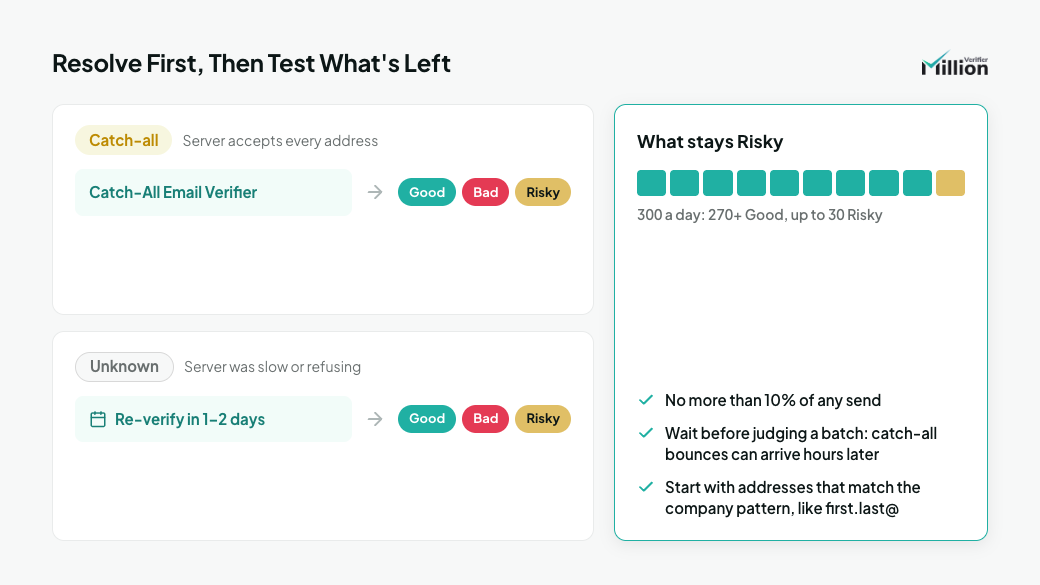
Try to resolve them first, then test what's left in small, monitored batches.
- Catch-all leads: Apollo and a verifier use different evidence here. Apollo says it can tell valid from invalid addresses on catch-all domains, using data from its own network. A verifier asks the receiving server, which on a catch-all domain accepts every address and won't confirm any single mailbox, so it returns Risky. The two can disagree without either being wrong. The Catch-All Email Verifier resolves part of that segment into Good or Bad. Whatever remains stays Risky.
- Unknown leads: the receiving server didn't give a clear answer, often because it was slow or temporarily refusing connections. Verify them again a day or two later, before you send.
- What stays Risky: keep it to no more than 10% of any send and use small batches. A bounce from a catch-all domain can arrive hours later as a separate bounce email, so give each batch time before you judge it.
If you have to choose between Risky leads, start with the ones whose address matches the company's known pattern, such as first.last@. How to Handle Catch-All and Risky Emails covers the full method.
When should you re-verify an Apollo export?
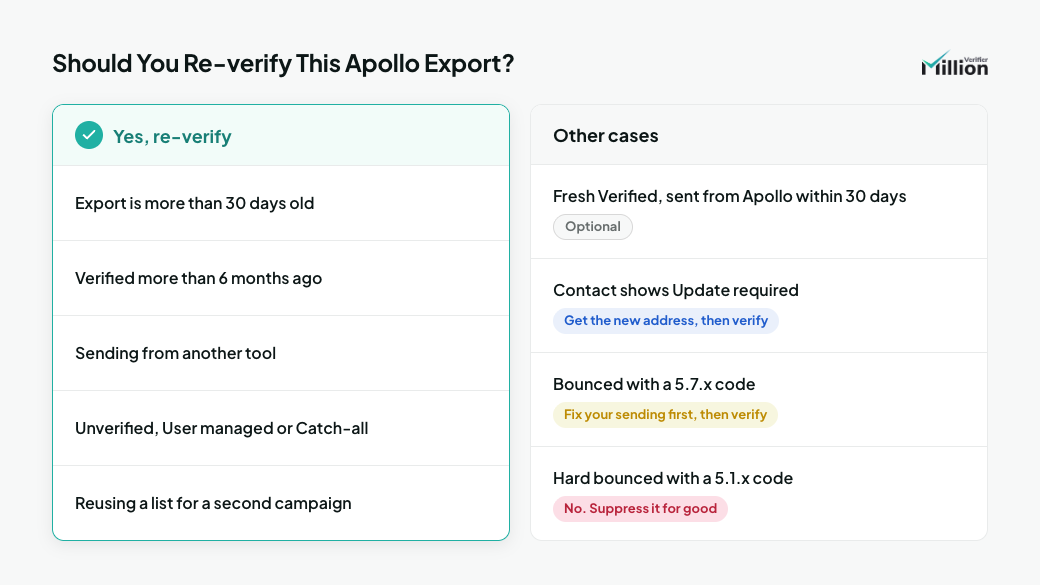
Re-verify whenever an export is more than 30 days old, whenever you send from another tool, and before you reuse contacts in a new sequence.
Situation | Re-verify? |
|---|---|
Fresh Verified contacts, sent from Apollo within 30 days | Optional. Apollo's check and its refund cover you |
Fresh export sent from another tool | Yes. Apollo's refund doesn't apply there |
Export more than 30 days old | Yes, before any new sequence |
Contacts verified more than six months ago | Yes, always |
Unverified, User managed or Catch-all contacts | Yes, before the first send |
Contact now shows Update required | Get the new address, then verify it |
Contact hard bounced with a 5.1.x code | No. Suppress it for good |
Contact bounced with a 5.7.x code | Fix your sending first, then verify again before you retry |
Reusing a list for a second campaign | Yes, even if the first send went cleanly |
Does Apollo's own verification make a second check unnecessary?
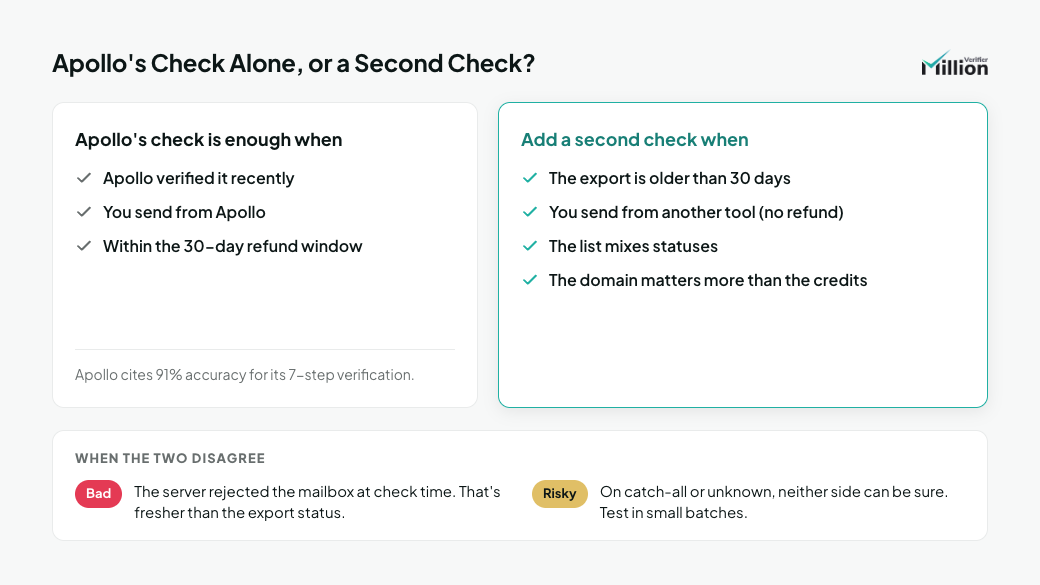
Sometimes. Apollo says you don't need a third-party verifier, in its Troubleshoot Bounced Emails article. Its Email Status Overview cites a 91% accuracy rate for its 7-step verification, which combines server checks with delivery and bounce data from its network. Apollo also warns that third-party tools may flag some Apollo-verified emails as invalid, or reject valid ones as catch-all or unknown.
For a contact Apollo verified recently, emailed from Apollo within the 30-day refund window, Apollo's check plus its refund is a reasonable safety net. A second check earns its keep when:
- The export is older than 30 days.
- You send from another tool, where Apollo's credit refund doesn't apply.
- The list mixes statuses, such as Unverified, User managed or Catch-all contacts.
- The sending domain matters more than the credits, such as your main company domain or a client's domain.
When the two disagree, look at what each result is based on. A Bad result means the receiving server rejected the mailbox when it was checked, which is fresher than a status set at the time of export. When they disagree on catch-all or unknown addresses, neither side can be sure, so test those in small batches.
Frequently asked questions
Why are my Apollo emails bouncing?
Usually because the data has aged. People change jobs and companies close their mailboxes, so an address that was verified months ago may no longer exist. Catch-all domains and policy blocks from your own sending setup can also look like Apollo bounces. Check the bounce code: 5.1.x means a dead address, 5.7.x means the provider refused your mail.
What is a good bounce rate for Apollo sequences?
Aim for under 1% hard bounces. Apollo calls a bounce rate under 2% acceptable and says to investigate immediately if it consistently exceeds 5%.
Does Apollo refund credits for bounced emails?
Yes, in some cases. Apollo refunds the credit if a verified email bounces within 30 days of purchase, but only for emails sent through Apollo. Leads you export and send from another tool aren't covered.
Are Apollo's verified emails accurate?
Apollo says its verified emails have an accuracy rate of more than 90%. Verification is a snapshot, though, and Apollo doesn't offer the same bounce guarantee for verified emails it provided more than six months ago.
Should I email Apollo's catch-all contacts?
Only after trying to resolve them and only in small batches. Keep the remaining Risky contacts to no more than 10% of any send, and watch each batch before you send the next.
How often should I re-verify Apollo leads?
Before every new sequence if the export is more than 30 days old or you're sending from another tool, and always when you reuse a list for another campaign.
Verify your next Apollo export
A verified status tells you what was true when Apollo checked. A fresh verification tells you what's true today. Run your next export through MillionVerifier before it goes into a sequence, and keep your bounces well under the line Apollo calls acceptable.
Create your free account to get 100 free credits, no credit card needed.
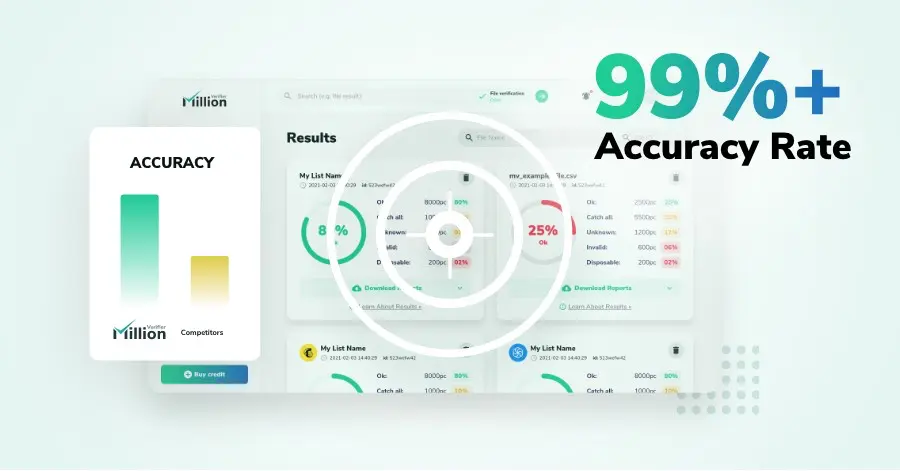
We have kept improving our email verification software for over six years now, and we are incredibly proud of our outstanding 99%+ email verification accuracy.
We have created MillionVerifier to provide the best email verification service possible for email marketers with higher email verification needs.

Our customers love what we do. We work hard to deliver the best results and user experience for our customers.