What Is a Good Email Bounce Rate? Benchmarks for Newsletters and Cold Email
A good email bounce rate is under 2% of emails sent, with hard bounces under 1%. Investigate as soon as your total reaches 2%. Most email platforms that publish a limit act at 5%, and at least one acts at 2%. Cold email doesn't get a looser limit.
- 2% is a market benchmark, not an official rule. Gmail, Yahoo and Outlook.com don't publish a bounce threshold.
- Benchmarks disagree because they measure different things. Check what your platform counts as a bounce before you compare yourself with an "industry average".
- The cheapest fix is before you send. Verifying a list removes addresses that would hard bounce. It doesn't remove policy blocks, which are a sender problem.
What is email bounce rate?
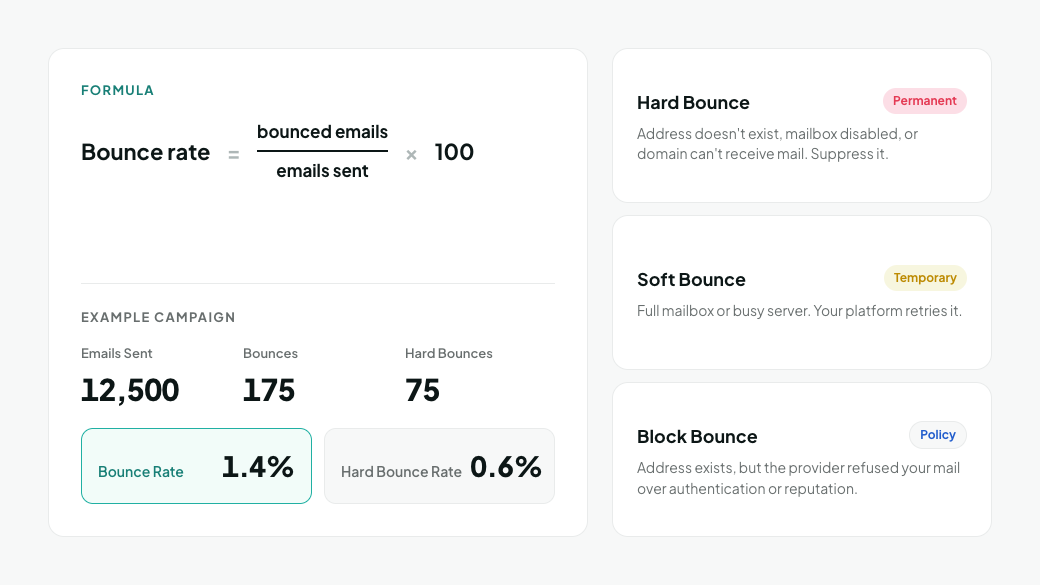
Email bounce rate is the percentage of sent emails that the receiving server rejected or couldn't deliver.
Bounce rate = (bounced emails / emails sent) x 100For example, a campaign sent to 12,500 addresses with 175 bounces has a bounce rate of 1.4%. If 75 of those bounces were hard bounces, the hard bounce rate is 0.6%.
- A hard bounce is a permanent failure. The address doesn't exist, the mailbox is disabled, or the domain can't receive mail. Suppress the address.
- A soft bounce is a temporary failure, such as a full mailbox or a busy server. Your platform retries it.
- A block bounce is a policy rejection. The address exists, but the provider refused your mail because of authentication or reputation. Many platforms report it as a hard bounce.
To read the codes behind each type, see 550 5.1.1 and Other Hard Bounce Codes.
What is a good bounce rate for newsletters and cold email?
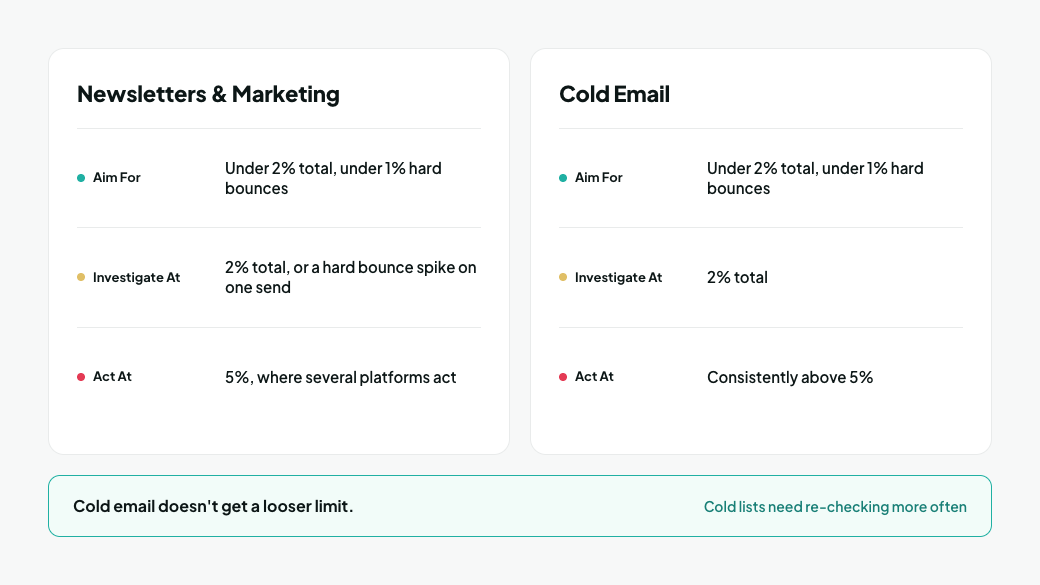
Aim for under 2% total and under 1% hard bounces on both channels. Cold email doesn't get a looser limit. The difference is how often cold lists drift above the line, because they're built from data that ages.
Channel | Aim for | Investigate at | Act immediately at | Where the line comes from |
|---|---|---|---|---|
Newsletters and marketing email | Under 2% total, under 1% hard bounces | 2% total, or a hard bounce spike on one send | 5%, where several platforms act | 2% is the common market benchmark. See the platform table below |
Cold email | Under 2% total, under 1% hard bounces | 2% total | Consistently above 5% |
The 1% hard bounce target is our recommendation, not a platform rule. It leaves room for the bounces verification can't prevent: catch-all domains that accept every address during the check, and mailboxes disabled between verification and send.
Cold lists need re-checking more often. Apollo says it doesn't provide the same bounce rate guarantee for verified emails it delivered more than six months ago (Apollo). If a data provider won't stand behind a six-month-old address, re-verify it before you add it to a new sequence.
At what bounce rate do email platforms take action?
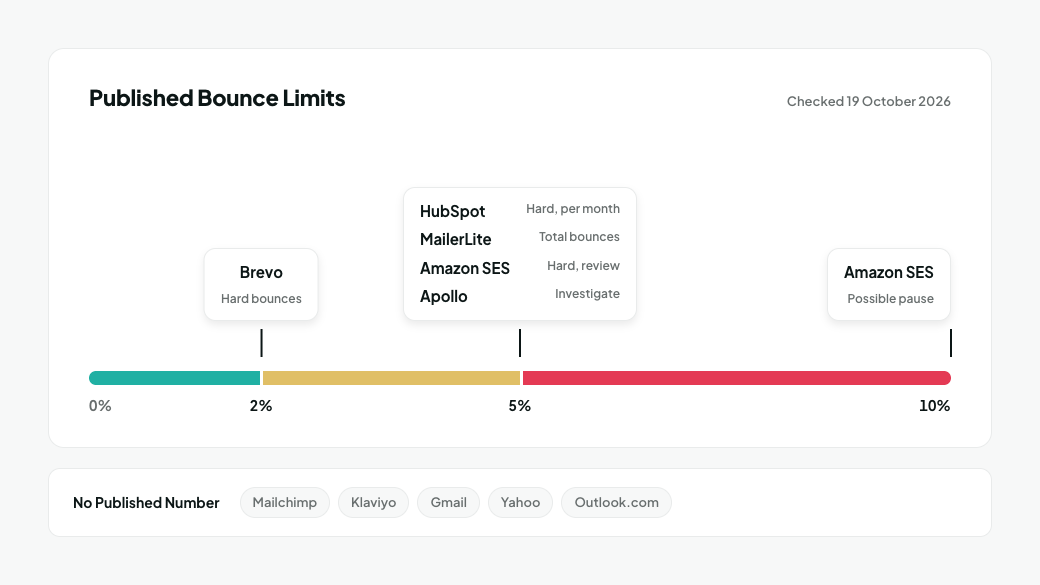
Most platforms that publish a limit act at 5%. Brevo acts at 2%. Others publish no number at all, and none of the big mailbox providers do.
Platform | Published bounce limit | What happens | Source |
|---|---|---|---|
Amazon SES | Review at 5% hard bounces; possible pause at 10% | Account placed under review, then sending may be paused until fixed | |
HubSpot | 5% hard bounces in a month | Marketing email sending may be suspended | |
MailerLite | More than 5% bounces | Account may be suspended immediately and investigated | |
Brevo | Hard bounce rate above 2% on recent campaigns | Campaigns and account can be suspended | |
Apollo | Under 2% acceptable; investigate if consistently above 5% | Hard-bounced addresses are removed; sequences can be auto-paused | |
Mailchimp | No published number | Automatic suspension when a single send exceeds "industry thresholds" | |
Klaviyo | No account-level percentage | Suppresses an address after a hard bounce or 7 consecutive soft bounces | |
Gmail, Yahoo, Outlook.com | No published bounce threshold | Filtering and rejections based on overall reputation |
We checked each platform's own policy pages on 19 October 2026 and found no published bounce threshold in Mailchimp's or Klaviyo's. Policies change: HubSpot last updated its suspension page on 23 September 2026.
Complaint limits are far stricter than bounce limits. HubSpot and Amazon SES both act at a 0.1% spam complaint rate, and MailerLite and Brevo at 0.2%. A list can stay under every bounce limit and still get an account suspended on complaints alone.
Why do bounce rate benchmarks disagree?
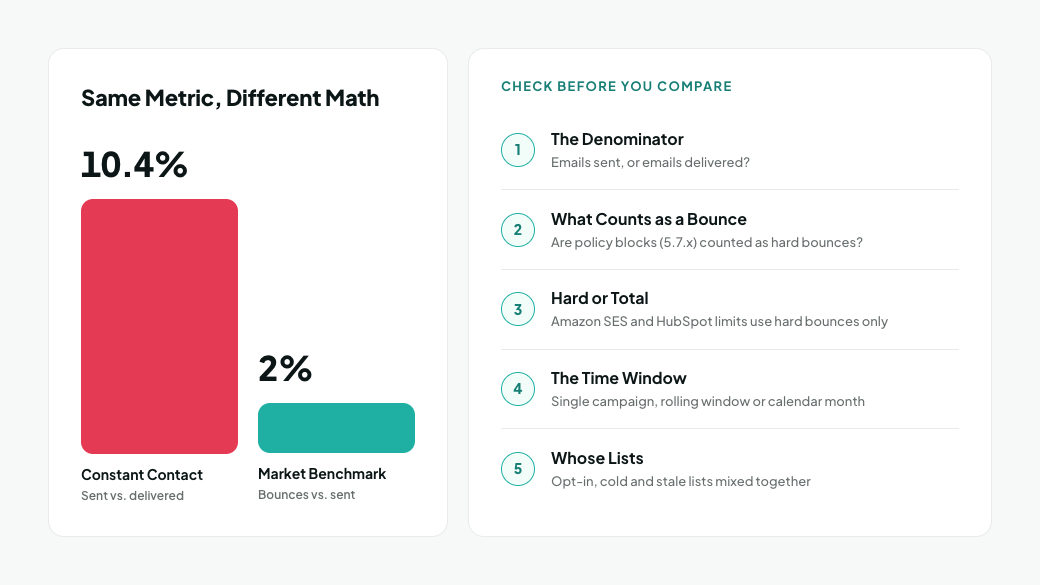
Published "average bounce rates" range widely because each source measures something different. Constant Contact, for example, reported an all-industries average bounce rate of 10.4% in data published in January 2024, five times the 2% benchmark (Smart Insights' compilation of Constant Contact data). Constant Contact measures bounce rate as emails sent compared with emails delivered, so every email that wasn't delivered counts, whatever the reason. That doesn't make 10% normal for your list. It shows how much the definition moves the number.
Before you compare yourself with any average, check these five differences:
- The denominator. Most platforms divide bounces by emails sent. Some reports divide by emails delivered or accepted, which gives a different figure for the same campaign.
- What counts as a bounce. Some platforms count policy blocks (5.7.x codes) as hard bounces. A sudden authentication problem can then look like a list problem. See Hard Bounces vs. Spam Complaints for how to tell them apart.
- Hard or total. Amazon SES bases its bounce rate on hard bounces only, and HubSpot's limit is a hard bounce limit. A benchmark that reports total bounces isn't comparable with either.
- The time window. A single campaign, a rolling window and a calendar month give different numbers. HubSpot assesses its limits cumulatively over a month.
- Whose lists. Industry averages mix opt-in newsletters, cold outreach and lists nobody has mailed in years. Data published by verification companies also skews high, because people tend to verify the lists they already suspect.
The benchmark that matters is your own hard bounce rate, measured the same way after every send.
Which bounce rate should you track: hard, soft or block?
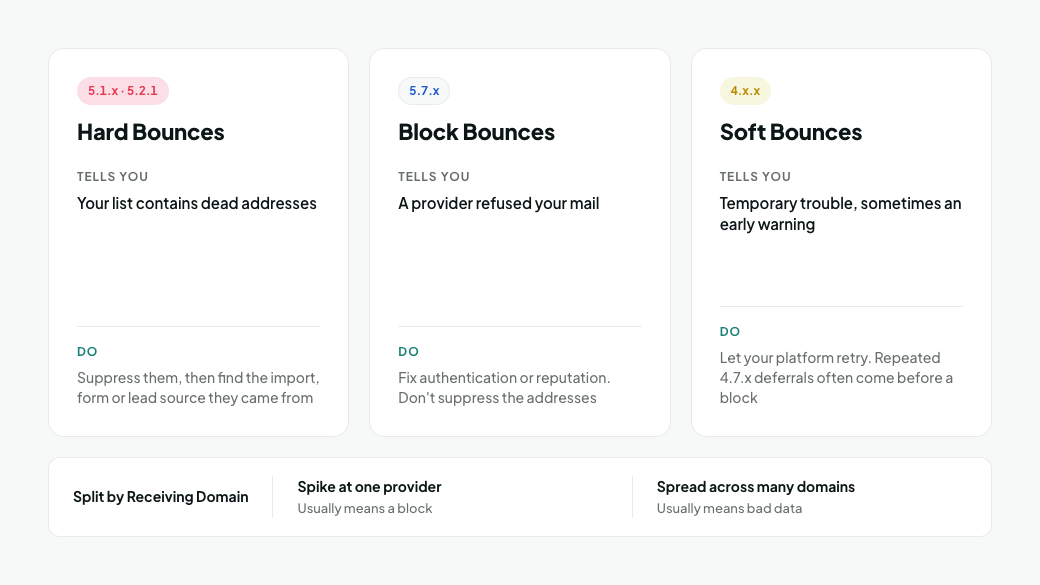
Track all three, but act on them differently.
Bounce type | What it tells you | What to do |
|---|---|---|
Hard bounces (5.1.x, 5.2.1) | Your list contains dead addresses | Suppress them, then find the import, form or lead source they came from |
Block bounces (5.7.x) | A provider refused your mail | Fix authentication or reputation. Don't suppress the addresses |
Soft bounces (4.x.x) | Temporary trouble, sometimes an early warning | Let your platform retry. Repeated 4.7.x deferrals often come before a block |
Split each rate by receiving domain as well. A spike at one provider on one day usually means a block. Bounces spread across many domains usually mean bad data.
What should you do if your bounce rate is too high?
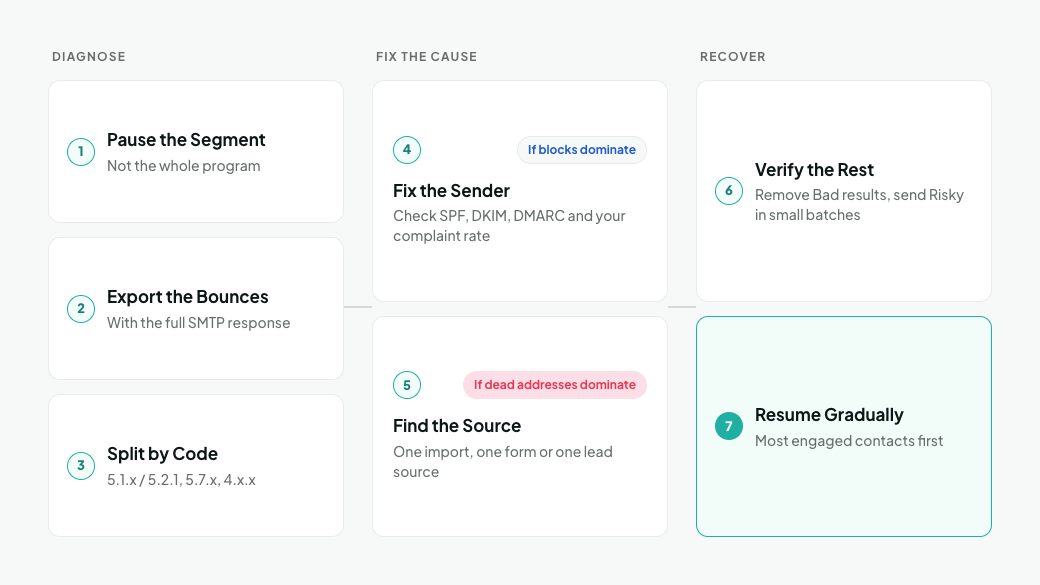
Stop sending to the affected segment, find out which kind of bounce caused the spike, and fix that cause before you resend. Work through these steps in order:
- Pause the affected segment, not the whole program. Keep sending to engaged contacts on other lists while you investigate.
- Export the bounces with the full SMTP response. A "hard bounce" label isn't enough. You need the code and the provider's error text.
- Split them by code. 5.1.x and 5.2.1 are dead addresses. 5.7.x are policy blocks. 4.x.x are temporary. 550 5.1.1 and Other Hard Bounce Codes has a decision table for each code.
- If blocks dominate, fix the sender. Check SPF, DKIM and DMARC, and look at your complaint rate. Re-cleaning the list won't help.
- If dead addresses dominate, find the source. A cluster usually traces back to one import, one form or one lead source. Fix it there.
- Verify the rest of the list before the next send. Remove Bad results and send to Risky results in small batches.
- Resume gradually, most engaged contacts first, and watch your platform's dashboard after each send.
How do you keep your bounce rate low?
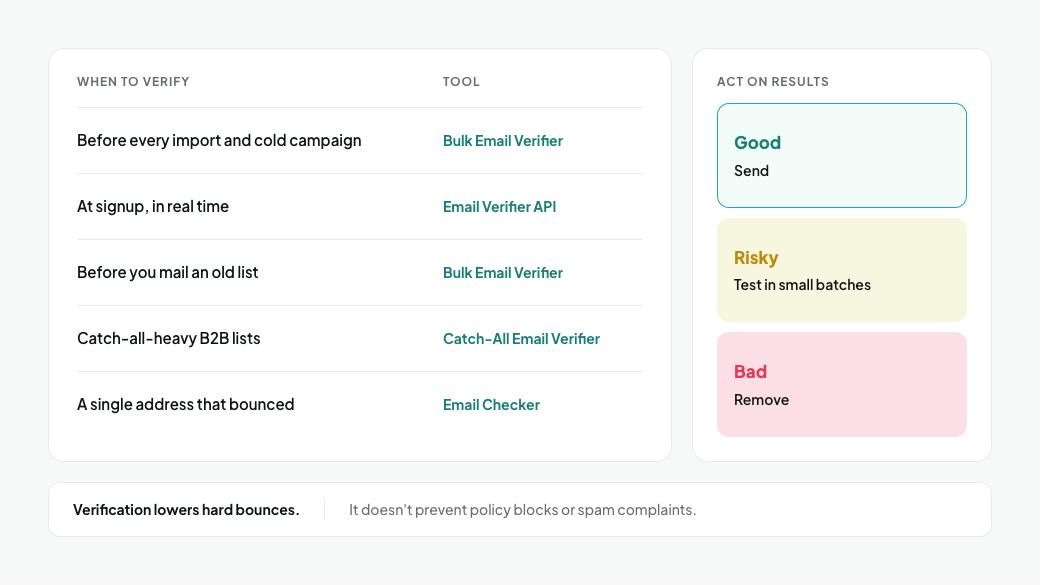
Verify addresses before they reach a campaign. A verifier checks each address with the receiving mail server without sending an email, so dead addresses are removed before they can bounce.
- Before every import and every cold campaign: run the list through the Bulk Email Verifier. Send to Good results, test Risky results in small batches and remove Bad results.
- At signup: check addresses in real time with the Email Verifier API, so typos and disposable addresses never enter your list.
- Before you mail an old list: verify the whole list first. Addresses decay as people change jobs and abandon accounts.
- For catch-all-heavy B2B lists: the Catch-All Email Verifier resolves part of the catch-all segment into valid or invalid.
- For a single address that bounced: check it with the free Email Checker before you suppress it.
Verification lowers hard bounces. It doesn't prevent policy blocks or spam complaints, which depend on your authentication, your content and whether recipients want your mail.
Frequently asked questions
Is a 5% email bounce rate bad?
Yes. 5% is where several platforms act: MailerLite may suspend an account above 5%, HubSpot may suspend marketing email at a 5% monthly hard bounce rate, and Amazon SES places accounts under review at 5%. Brevo is stricter and can suspend campaigns above a 2% hard bounce rate. Investigate at 2%.
What is the average email bounce rate?
There isn't one reliable average, because platforms count bounces differently. Constant Contact reported 10.4% across all industries in data published in January 2024, counting every email that wasn't delivered. Figures based on hard bounces alone are far lower. Compare yourself with the 2% line and with your own past sends instead.
What is a good bounce rate for cold email?
Under 2%. Apollo calls a bounce rate under 2% acceptable and tells users to investigate immediately if it stays above 5%. Cold lists drift above the line faster than newsletters, so verify every export before it goes into a sequence.
Does Gmail have a bounce rate limit?
Gmail doesn't publish one. Its sender guidelines publish spam complaint limits instead: keep spam rates below 0.1% and never reach 0.3%. High bounce rates still hurt your reputation with Gmail, and your sending platform may enforce its own limit.
Is a 0% bounce rate possible?
Rarely, and it isn't a useful target. Catch-all domains accept every address during verification, and some mailboxes are disabled between verification and send. A near-zero hard bounce rate on a verified list is realistic.
Do soft bounces count toward the bounce rate?
It depends on the platform. Amazon SES bases its bounce rate on hard bounces, and HubSpot's limit is a hard bounce limit. Other platforms report total bounces, so check which number you're looking at.
How often should I verify my email list?
Before every import, before mailing any list you haven't mailed recently, and before every cold campaign. For data from a lead provider, re-verify any export older than a few months before you add it to a new sequence.
Check your list before your next send
Your bounce rate is decided before you click send. Run your next list through MillionVerifier, remove the addresses that would hard bounce, and keep your rate well under the 2% line.
Create your free account to get 100 free credits, no credit card needed.
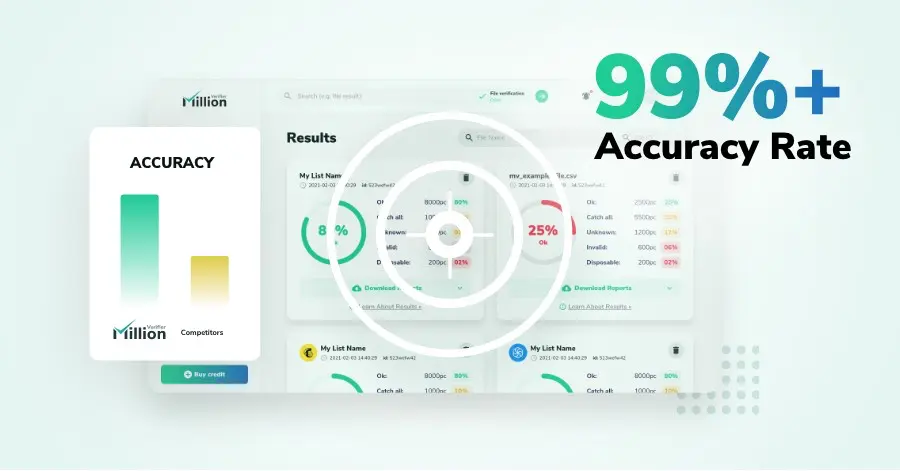
We have kept improving our email verification software for over six years now, and we are incredibly proud of our outstanding 99%+ email verification accuracy.
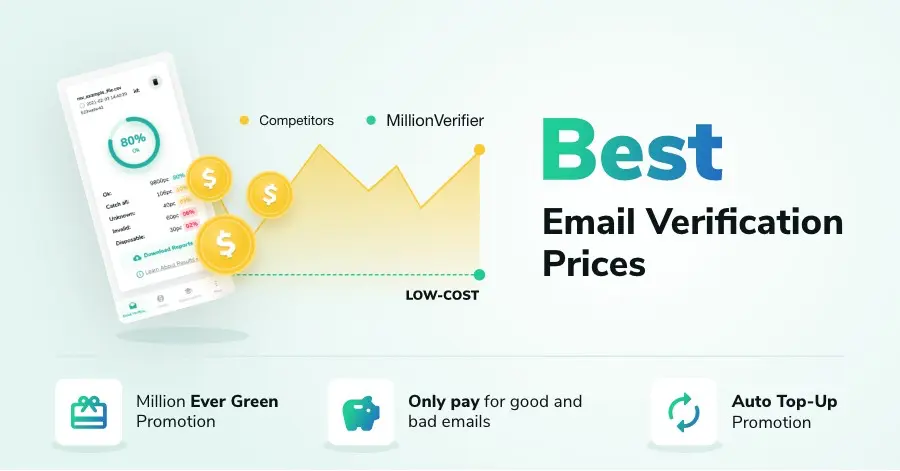
We have created MillionVerifier to provide the best email verification service possible for email marketers with higher email verification needs.

Our customers love what we do. We work hard to deliver the best results and user experience for our customers.