Role-Based Emails in Cold Outreach: When to Skip info@ and sales@
In cold outreach, skip role-based addresses like info@ and sales@ unless the company is very small or the role is exactly who you need to reach. These addresses usually lead to shared inboxes, screened by a gatekeeper and read by several people who can each report you as spam. Some, like abuse@ and postmaster@, exist to receive spam reports. Role addresses are often perfectly valid, so verification marks them Good. Use the role flag in your verification results to find them, then decide on them separately. For newsletters, a role address that subscribed through your own form is usually fine.
- Valid isn't the same as worth emailing. A role address can verify as Good and still cost you complaints and replies.
- Never cold email abuse@, postmaster@ or security@. They're where spam reports and security issues are sent.
- Platforms block some role addresses, not all. Mailchimp blocks abuse@, postmaster@, support@ and others on import, but info@ and sales@ aren't on its list. That's why you need your own rule.
What is a role-based email address?
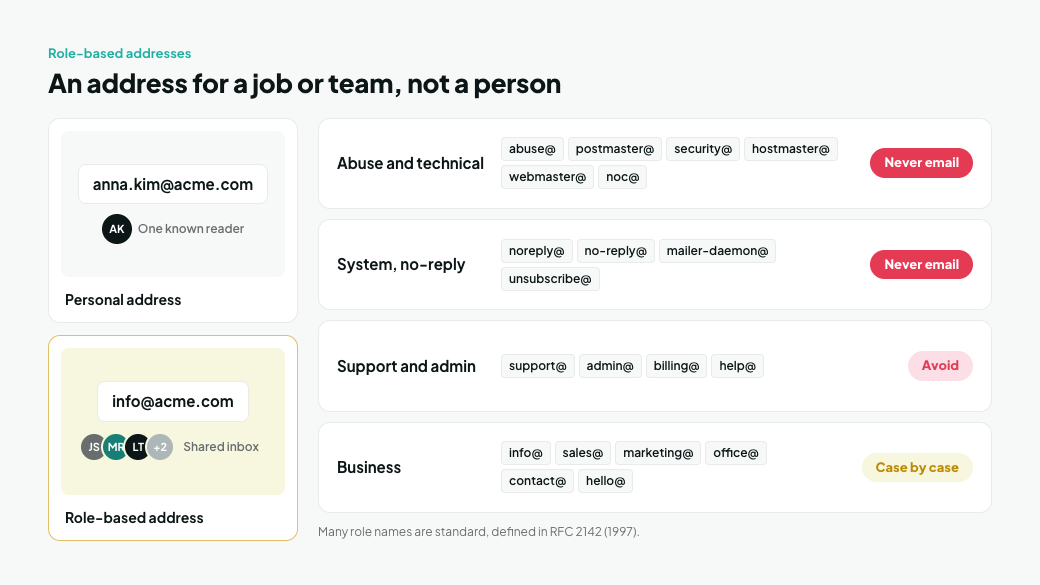
A role-based address belongs to a job, team or function rather than a person, like [email protected] or [email protected]. Several people usually share it, and the people behind it change over time.
Many role names are standard. RFC 2142, the internet standard for common mailbox names, defines business mailboxes such as info@, marketing@, sales@ and support@, and operational ones such as abuse@, postmaster@ and security@ (RFC 2142). The standard dates from 1997, and even then it noted that info@ was often tied to an autoresponder.
Not all role addresses carry the same risk:
Type | Examples | Cold email risk |
|---|---|---|
Abuse and technical | abuse@, postmaster@, security@, hostmaster@, webmaster@, noc@ | Never email. These receive spam reports and security issues |
System and no-reply | noreply@, no-reply@, mailer-daemon@, unsubscribe@ | Never email. Nobody reads them, or they're automated |
Support and admin | support@, admin@, billing@, help@ | Avoid. They feed a ticket queue, not a buyer |
Business | info@, sales@, marketing@, office@, contact@, hello@ | Decide case by case, using the rules below |
Why do role-based addresses underperform in cold email?
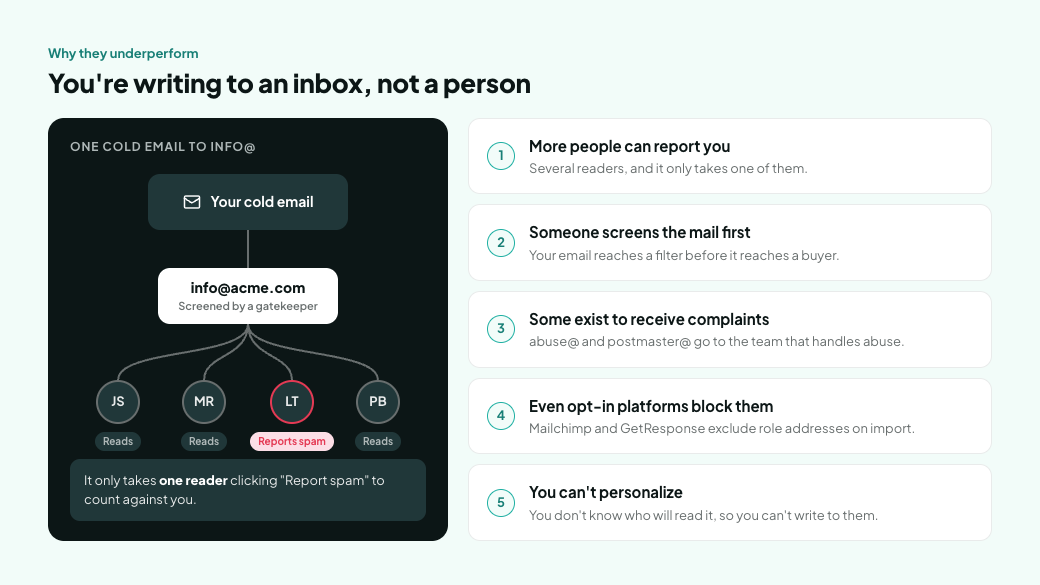
Because you're writing to an inbox, not a person. Five things work against you:
- More people can report you. A shared inbox has several readers, and it only takes one of them to click "Report spam" or "Junk". Most company inboxes run on Google Workspace or Microsoft 365, and complaints from a shared inbox count against you with whichever filter it runs on.
- Someone screens the mail first. Shared inboxes like info@ and sales@ are usually checked by whoever manages them before anything is passed on. Your email reaches a filter, human or automated, before it reaches a buyer.
- Some exist to receive complaints. abuse@ and postmaster@ are where other people send spam reports. A cold email there goes straight to the team that handles abuse.
- Even opt-in platforms block them. Newsletter platforms, where every contact is supposed to have opted in, still block role addresses on import. Mailchimp blocks a list of them because some are associated with high bounce rates and spam complaints (Mailchimp). GetResponse excludes them too, noting that permission for a group inbox would have to come from each person who reads it (GetResponse). If they're too risky for opt-in lists, they're riskier on a cold one.
- You can't personalize. You don't know who will read the email, so you can't write to their role, their problems or their name.
When is it fine to email a role-based address?
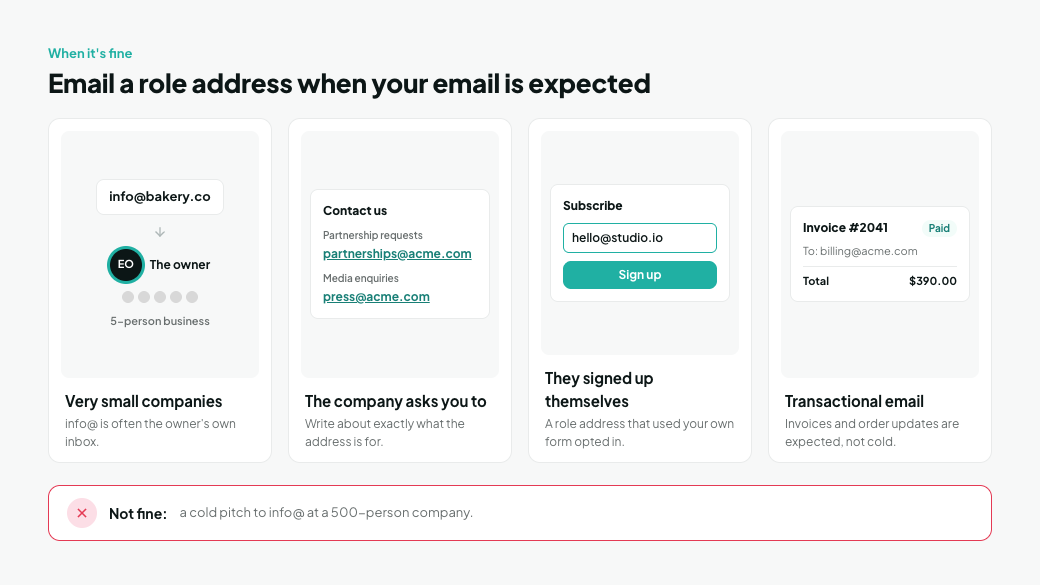
When the address is the right way in, not just the easiest one to find. Four common cases:
- Very small companies. At a five-person business, info@ is often the owner's own inbox. If you can't find a named contact and the company is tiny, info@ may be the best route in.
- The company asks you to use it. If a website lists partnerships@ for partnership requests or press@ for media enquiries, writing there about exactly that is what they asked for.
- The person signed up themselves. A role address that subscribed through your own form opted in like anyone else. Mailchimp blocks role addresses on import but still lets them join through a signup form.
- You're sending transactional email. Invoices to billing@ or order updates to a shared purchasing inbox are expected, not cold.
The common thread is that the email is expected. A cold pitch to info@ at a 500-person company isn't.
How do you find role-based addresses in your list?
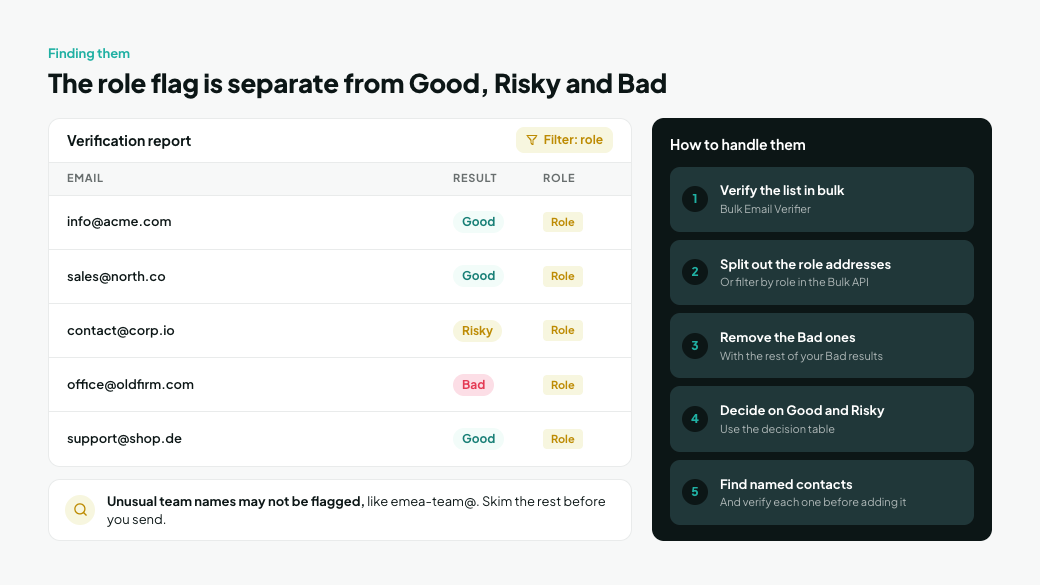
Verify the list and look at the role flag. MillionVerifier marks role addresses in its results alongside the Good, Risky and Bad verdict, so you can see them in the report and filter them out (Getting started).
The role flag is separate from the verdict. A role address can come back Good, Risky or Bad, and a Good role address is exactly the case verification alone won't solve. To handle them:
- Run the list through the Bulk Email Verifier.
- Download the report and split out every address flagged as role. Developers can filter by role when downloading results from the Bulk API, and the single-email API returns a role field for each address (API documentation).
- Remove the Bad ones with the rest of your Bad results.
- Apply the decision table below to the Good and Risky role addresses. For Risky ones, follow How to Handle Catch-All and Risky Emails.
- For the ones you skip, look for a named contact at the same company, and verify each one before it goes into your list. Contacts you find in a lead database or guess from a pattern like first.last@ are where bounces come from. Why Are My Apollo Emails Bouncing? covers how to verify them.
Role detection works from known role names, so a team inbox with an unusual name, such as emea-team@, may not be flagged. Skim the remaining addresses for obvious team names before you send.
Should you send to a role-based address? A decision table
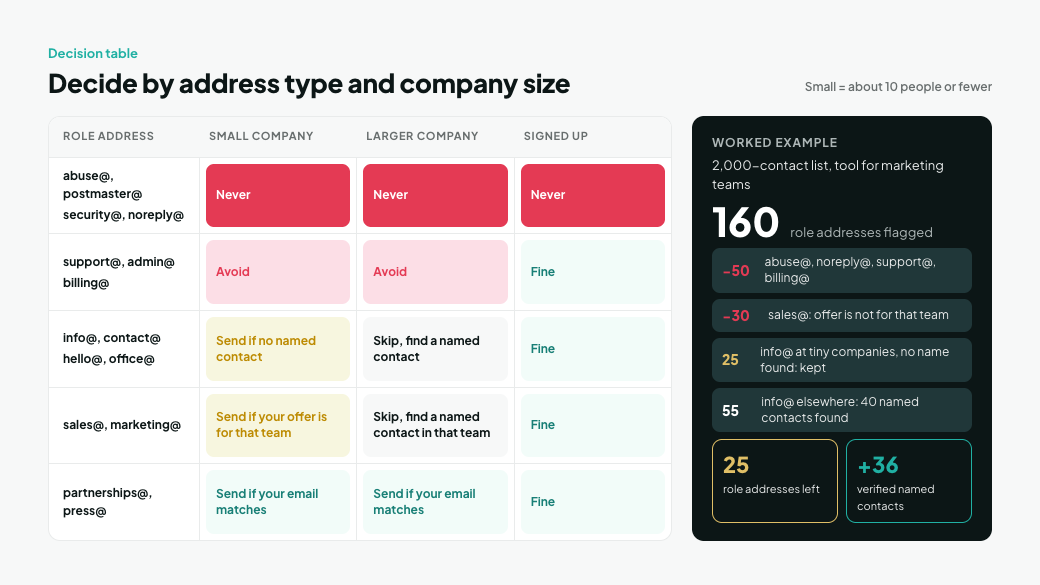
Use the type of address and the size of the company. "Small" here means roughly ten people or fewer, which is our rule of thumb rather than a standard.
Role address | Small company | Larger company | Signed up to your newsletter |
|---|---|---|---|
abuse@, postmaster@, security@, noreply@ | Never | Never | Never |
support@, admin@, billing@ | Avoid | Avoid | Fine |
info@, contact@, hello@, office@ | Send if you can't find a named contact | Skip and find a named contact | Fine |
sales@, marketing@ | Send if your offer is for that team | Skip and find a named contact in that team | Fine |
partnerships@, press@ | Send if your email matches what the address is for | Send if your email matches what the address is for | Fine |
For example, suppose you sell a tool for marketing teams, and verification flags 160 addresses in a 2,000-contact cold list as role addresses:
- 50 come out straight away: 20 abuse@, postmaster@ or noreply@ addresses and 30 support@ or billing@ addresses.
- 30 sales@ addresses come out too, because your offer isn't for the sales team.
- 80 are info@ or contact@ addresses. 25 belong to companies of ten people or fewer where you can't find anyone by name, so they stay. For the other 55, you look for named contacts and find 40. You verify them: 36 come back Good and go into the list, and 4 come back Bad. The 15 companies where you found no one are dropped.
The list ends up with 25 role addresses instead of 160, plus 36 verified named contacts you can actually write to.
How do you email a role-based address safely?
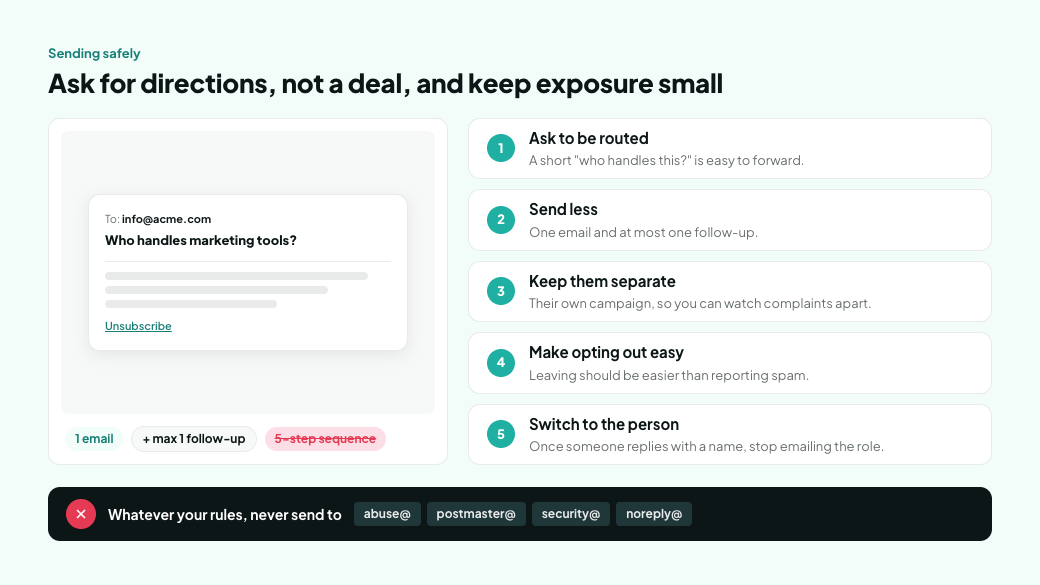
Treat it as a request for directions, not a pitch, and keep the exposure small.
- Ask to be routed. A short email asking who handles the topic is easy for whoever screens the inbox to forward, and it reads less like spam than a full pitch.
- Send less. One email and at most one follow-up. A five-step sequence to a shared inbox multiplies the chances that someone reports it.
- Keep them separate. Send role addresses from their own campaign so you can watch their complaint and reply rates apart from your named contacts. How to Verify Smartlead Leads Before Every Campaign shows how to run a separate, low-limit campaign.
- Make opting out easy. Include a clear unsubscribe link or line, so leaving is easier than reporting spam.
- Switch to the person as soon as you have a name. Once someone replies with a contact, stop emailing the role address.
And whatever your rules, never send to abuse@, postmaster@, security@ or noreply@.
Frequently asked questions
What is a role-based email address?
An address that belongs to a job, team or function rather than a person, such as info@, sales@ or support@. It's usually shared by several people, and who reads it changes over time.
Should I send cold emails to info@ addresses?
Usually not. At larger companies, info@ is a shared inbox that someone screens before anything is passed on, so look for a named contact instead. At very small companies, info@ may be the owner's own inbox and a reasonable way in when you can't find a name.
Are role-based emails bad for deliverability?
They can be. Even newsletter platforms, where every contact is supposed to have opted in, block some role addresses on import. Mailchimp says some are associated with high bounce rates and spam complaints. A shared inbox also has more readers who can report you, and those reports count against you with whichever business email filter the inbox runs on.
Does email verification remove role-based addresses?
No. Role addresses are often valid, so verification can return them as Good. MillionVerifier flags them separately, so you can find them in your results and decide whether to send.
Which role-based addresses should I never email?
abuse@, postmaster@, security@ and noreply@. The first three receive spam reports and security issues, and nobody reads the last one.
Can a role-based address join my newsletter?
Yes, if it subscribes through your own signup form. Someone opted in on purpose, which is different from adding the address to a cold list.
Find the role addresses in your next list
Verification tells you which addresses work. The role flag tells you which ones lead to a shared inbox instead of a person. Run your next cold list through MillionVerifier, split out the role addresses, and send only where an email is likely to be wanted.
Create your free account to get 100 free credits, no credit card needed.
We have kept improving our email verification software for over six years now, and we are incredibly proud of our outstanding 99%+ email verification accuracy.
We have created MillionVerifier to provide the best email verification service possible for email marketers with higher email verification needs.
Our customers love what we do. We work hard to deliver the best results and user experience for our customers.