Bounce Rate Limits for Newsletter Platforms: Mailchimp, Kit, beehiiv, MailerLite and More
Most newsletter platforms don't publish a bounce rate limit. Of the ten we checked on 27 October 2026, only three publish a number: Brevo (hard bounces above 2%), MailerLite (bounces above 5%), and Amazon SES, which Sendy and EmailOctopus Connect send through (review at 5%, possible pause above 10%). Kit, Mailchimp, beehiiv, AWeber, GetResponse and standard EmailOctopus accounts act at their own discretion, and Ghost publishes no account-level limit at all. Keep hard bounces under 1% and total bounces under 2%, and you stay under every published bounce line.
- No published number doesn't mean no limit. Kit's policy says accounts closed for elevated bounce, complaint or unsubscribe rates aren't entitled to a refund or an export of their subscriber lists.
- Complaint limits are stricter and more common. Five of the ten publish complaint guidance. Most draw the line at 0.1% to 0.2%. The higher marks are beehiiv's 0.30% "problematic" level and the 0.5% at which Amazon SES may pause sending.
- Verify new lists before you import them, and clean the ones already there. Run new lists through the Bulk Email Verifier first, and connect your platform to MillionVerifier to clean the audiences you already have.
Bounce and complaint limits by newsletter platform
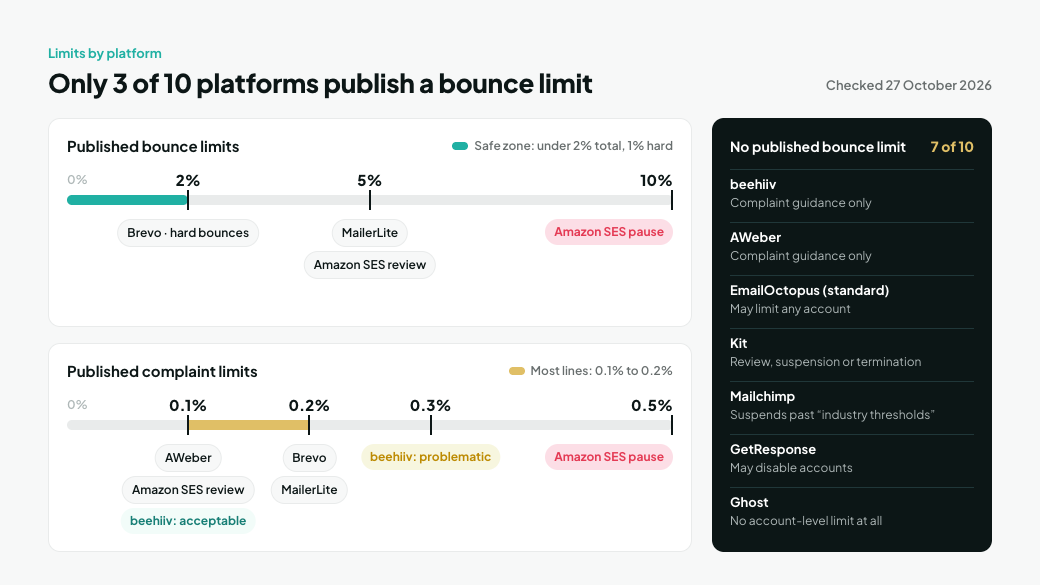
We checked each platform's own policy and help pages on 27 October 2026. Where a platform publishes no number, the table says so instead of repeating figures from third-party blogs.
Platform | Published bounce limit | Published complaint limit | What happens | Source |
|---|---|---|---|---|
Brevo | Hard bounce rate above 2% on recent campaigns | Above 0.2% | Campaigns and the account can be suspended | |
MailerLite | More than 5% bounces | More than 0.2% | Account may be suspended immediately and investigated | |
Sendy and EmailOctopus Connect (via Amazon SES) | Review at 5% hard bounces; possible pause above 10% | Review at 0.1%; possible pause above 0.5% | Amazon places the account under review, then may pause sending | |
beehiiv | None published | 0.10% or lower is acceptable; 0.30% or higher is problematic | Deferrals, blocking or spam placement. Complaints sent to beehiiv's abuse desk can lead to suspension | |
AWeber | None published | Below 0.1% per campaign | AWeber's team contacts you; the account may be shut down if complaints stay high | |
EmailOctopus (standard accounts) | None published | None published | EmailOctopus reserves the right to limit any account | |
Kit | None published | None published | Manual review, suspension or termination. Closed accounts get no refund and no export of their subscriber lists | |
Mailchimp | None published | None published | Automatic suspension when a single send exceeds "industry thresholds" | |
GetResponse | None published | None published | Accounts that violate its anti-spam policy may be disabled | |
Ghost | None published | None published | No account-level action published. Ghost stops sending newsletters to individual members whose emails keep failing or who mark them as spam. Self-hosted Ghost sends through your own Mailgun account, so Mailgun's rules apply there |
Policies change without notice, so check your own platform's page before you rely on a number. Substack isn't in the table because we couldn't find a Substack help or policy page that addresses bounce or complaint limits. For HubSpot, Klaviyo and Apollo, see What Is a Good Email Bounce Rate?
Why don't most platforms publish a bounce limit?
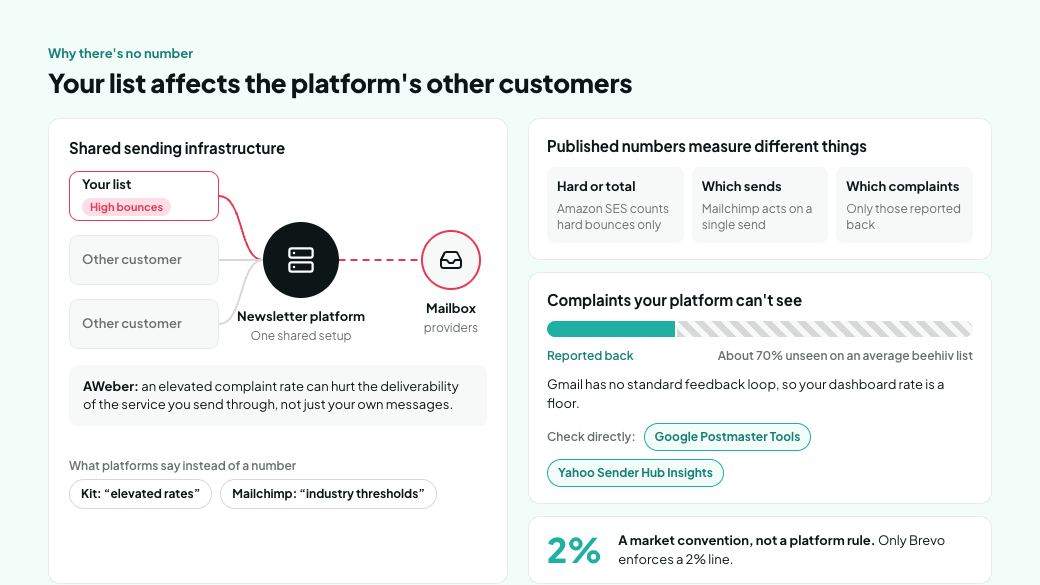
Platforms rarely say why, but the most likely reason is that your list affects their other customers. Newsletter platforms send most customers' mail through shared infrastructure. AWeber says it plainly: a complaint rate that stays elevated can hurt the deliverability of the service you send through, not just your own messages. So most platforms keep discretion, with wording like "elevated rates" (Kit) or "industry thresholds" (Mailchimp).
The platforms that do publish numbers don't measure the same thing:
- Hard or total bounces. Amazon SES counts hard bounces only. MailerLite's policy refers to bounces in general.
- Which sends count. Brevo looks at hard bounces on campaigns from the last 24 hours, or on campaigns sent to new contacts. Mailchimp acts on a single send, and AWeber watches each campaign. SES works from your account's overall rate.
- Which complaints count. A platform can only count complaints that mailbox providers report back to it. beehiiv notes that Gmail doesn't offer a standard feedback loop, and that on an average beehiiv list it can't see complaints for about 70% of the traffic. Your dashboard's complaint rate is a floor, not the full number.
To see the complaints your platform misses, check two sources directly. Google Postmaster Tools shows the spam rate Gmail measures for your domain, once you send enough mail to Gmail. Yahoo's Sender Hub Insights shows the inbox-based complaint rate Yahoo enforces. Hard Bounces vs. Spam Complaints covers what each one tells you.
The common 2% figure is a market convention, not a platform rule. Of the ten platforms we checked, only Brevo enforces a 2% line. The rest either act at 5% or don't say. Staying under 2% total and 1% hard bounces keeps you under every published line and gives you the most room where there's no number.
How do you stay under every platform's limit?
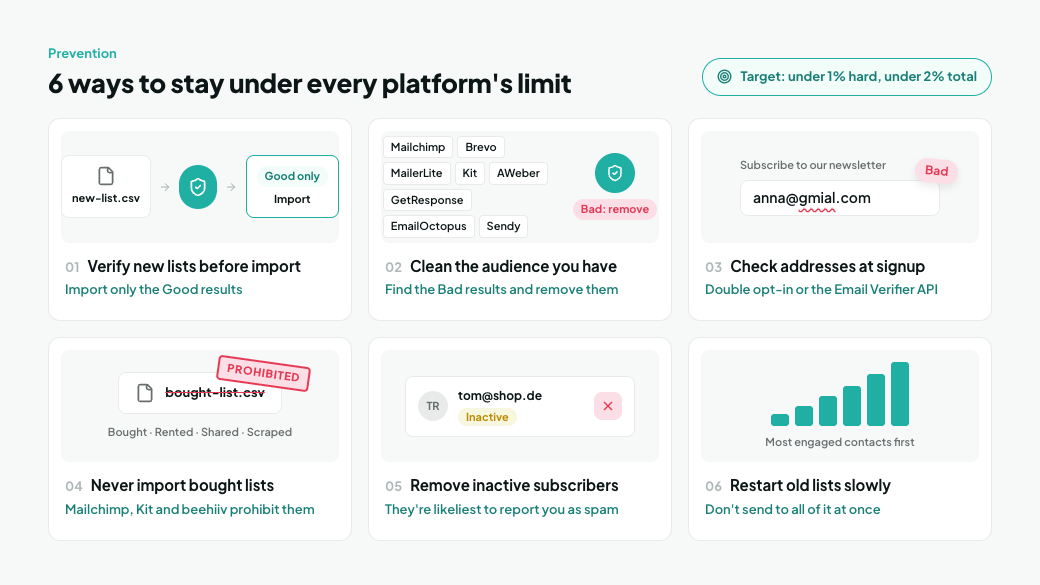
Keep dead addresses out of the account, clean out the ones already in it, and remove people who stop wanting your mail.
- Verify new lists before you import them. Run the CSV through the Bulk Email Verifier and import only the Good results. This works for every platform, including beehiiv and Ghost.
- Clean the audience you already have. MillionVerifier connects to Mailchimp, Brevo, MailerLite, Kit (listed as ConvertKit), AWeber, GetResponse, EmailOctopus and Sendy (All Integrations). The integration imports your existing contacts for verification, so you can find the Bad results and remove them from the account.
- Check addresses at signup. Use your platform's double opt-in, or the Email Verifier API on your form, so typos and disposable addresses never get in.
- Never import bought, rented, shared or scraped lists into a newsletter platform. Mailchimp, Kit and beehiiv all prohibit them in their policies, and they're where bounces, spam traps and complaints come from.
- Remove people who stop engaging. Inactive subscribers are the ones most likely to forget they signed up and report you as spam.
- Restart old lists slowly. If a list hasn't been mailed in months, follow How to Email an Old List Without Wrecking Your Sender Reputation instead of sending to all of it at once.
Already flagged or suspended? What to do first
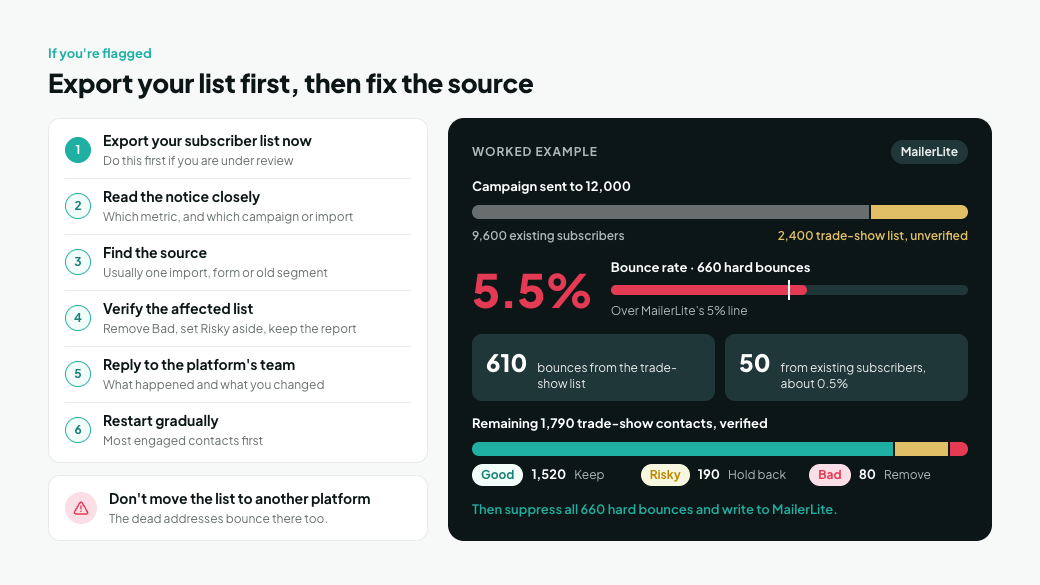
Stop sending to the list that caused it, export your subscribers while you still can, and show the platform what you've fixed.
- Export your subscriber list now. If your account is under review, do this first. Kit's policy says accounts closed for elevated rates aren't entitled to an export of their subscriber lists.
- Read the notice closely. Find out which metric triggered it (bounces, complaints or unsubscribes) and which campaign or import it points to.
- Find the source. A bounce spike usually traces back to one import, one form or one old segment.
- Verify the affected list. Remove Bad results, and set Risky results aside until the account is back in good standing. Keep the verification report, since it's evidence for the next step.
- Reply to the platform's team with what happened and what you changed: the source you fixed, the addresses you removed, and how you'll stop it happening again.
- Restart gradually, most engaged contacts first, and watch bounce and complaint rates on every send.
For example, suppose a MailerLite account with 9,600 subscribers imports a 2,400-contact list from a trade show without verifying it. The next campaign goes to all 12,000 and returns 660 hard bounces, a 5.5% bounce rate, over MailerLite's 5% line. 610 of the bounces come from the trade-show list, and just 50 from the original 9,600 subscribers, about 0.5%. You suppress all 660 hard-bounced addresses and verify the remaining 1,790 trade-show contacts: 1,520 come back Good, 190 Risky and 80 Bad. You remove the 80 Bad addresses, hold back the 190 Risky ones, and write to MailerLite.
Here's a reply you can adapt:
Subject: Account review: bounce rate on our 4 November campaign
Hi team,
Our 4 November campaign had a 5.5% bounce rate. We've found the cause: a 2,400-contact list from a trade show that we imported on 2 November without verifying it first. 610 of the 660 hard bounces came from that list. Our existing subscribers bounced at about 0.5% on the same send.
Here's what we've done:Suppressed all 660 hard-bounced addressesVerified the rest of the trade-show list and removed 80 more invalid addressesHeld back 190 addresses we couldn't confirm until our account is back in good standingAdded verification before every future import
We'd like to resume sending to our existing subscribers first, starting with the most engaged. Is there anything else you need from us?
Thanks, [Name]
Don't move the same list to another platform to get around a suspension. The dead addresses bounce there too, and the new platform can suspend you for the same reason. Kit, for one, says you won't be allowed to open a new account after it cancels one for these reasons.
Frequently asked questions
What bounce rate gets a Mailchimp account suspended?
Mailchimp doesn't publish a number. Its help center says it suspends accounts automatically when a single send exceeds industry thresholds. Since there's no published line, keeping each send under 2% total bounces and 1% hard bounces gives you the most room.
What is MailerLite's bounce rate limit?
MailerLite's anti-spam policy says an account may be suspended immediately if bounces exceed 5% or spam complaints exceed 0.2%.
Does Kit have a bounce rate limit?
Kit doesn't publish one. Its acceptable use policy says elevated bounce, complaint or unsubscribe rates may lead to manual review, suspension or termination, and that closed accounts aren't entitled to a refund or an export of their subscriber lists.
What is beehiiv's spam complaint threshold?
beehiiv considers a complaint rate of 0.10% or lower acceptable and 0.30% or higher problematic. It measures complaints only from mailbox providers that report them, which excludes Gmail.
Which newsletter platform has the strictest bounce limit?
Brevo, among the platforms we checked. It can suspend campaigns and accounts when the hard bounce rate on recent campaigns goes above 2%.
Why is my platform's complaint rate lower than I expected?
Your platform only sees complaints that mailbox providers report back, and Gmail doesn't provide a standard feedback loop. beehiiv estimates it can't see complaints for about 70% of an average list's traffic, so treat your dashboard figure as a minimum.
Clean your list before your platform does it for you
Most platforms won't tell you where their line is, so the safest number is one well under all of them. Verify your next list before you import it, and connect your platform to MillionVerifier to clean the audience you already have.
Create your free account to get 100 free credits, no credit card needed.

We have kept improving our email verification software for over six years now, and we are incredibly proud of our outstanding 99%+ email verification accuracy.

We have created MillionVerifier to provide the best email verification service possible for email marketers with higher email verification needs.

Our customers love what we do. We work hard to deliver the best results and user experience for our customers.