Email Verification Results Explained: Valid, Invalid, Catch-All, Unknown, Disposable and Role
Email verification sorts each address into one of six results, and MillionVerifier groups them into three qualities. Ok means the mailbox exists and is safe to send to (Good). Catch-all and unknown mean the receiving server didn't confirm the mailbox (Risky). Invalid and disposable mean don't send (Bad). Error means the check itself failed. Role and free are separate flags that can appear on any result. Send to Good, handle Risky with care, and remove Bad.
- The quality is the decision, the result is the reason. Good, Risky and Bad tell you what to do. Ok, catch-all, unknown, invalid and disposable tell you why.
- Risky isn't a verdict on the address. It means the server wouldn't say. MillionVerifier's own guidance is to use Risky addresses only if they belong to real subscribers who signed up recently.
- You don't pay for uncertain answers by default. MillionVerifier gives back the credits for catch-all and unknown results as goodwill credits, unless an account regularly verifies scraped lists or non-subscribers in large amounts.
What do email verification results mean?
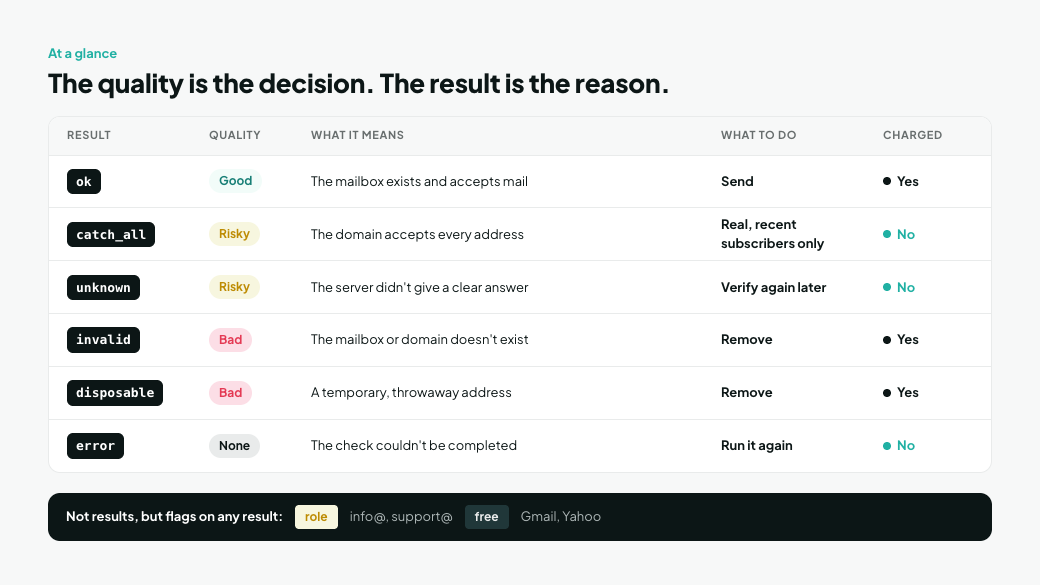
Here's every result and flag at a glance. The names in the first column are the ones the API returns; reports and dashboards show the same results with capitalized names. Other verifiers often call an ok result "valid", and some call catch-all "accept-all".
Result | Quality | What it means | What to do | Charged by default? |
|---|---|---|---|---|
ok | Good | The mailbox exists and accepts mail | Send | Yes |
catch_all | Risky | The domain accepts every address, so the mailbox couldn't be confirmed | Use only for real, recent subscribers; otherwise set aside | No |
unknown | Risky | The receiving server didn't give a clear answer | Verify again later | No |
invalid | Bad | The mailbox or domain doesn't exist or can't receive mail | Remove | Yes |
disposable | Bad | A temporary address from a throwaway email service | Remove, or ask for a permanent address | Yes |
error | None | The check itself couldn't be completed | Run it again | No |
role flag | Any | The address belongs to a function, such as info@ or support@ | Decide separately | Not a result |
free flag | Any | The address is on a free provider, such as Gmail or Yahoo | Usually nothing | Not a result |
MillionVerifier's help center sums it up in three lines: Good (ok) addresses are safe to use, Bad (invalid and disposable) addresses aren't, and Risky (catch-all and unknown) addresses may be safe if they belong to real subscribers who signed up recently (Email Verification Results).
Each result, explained
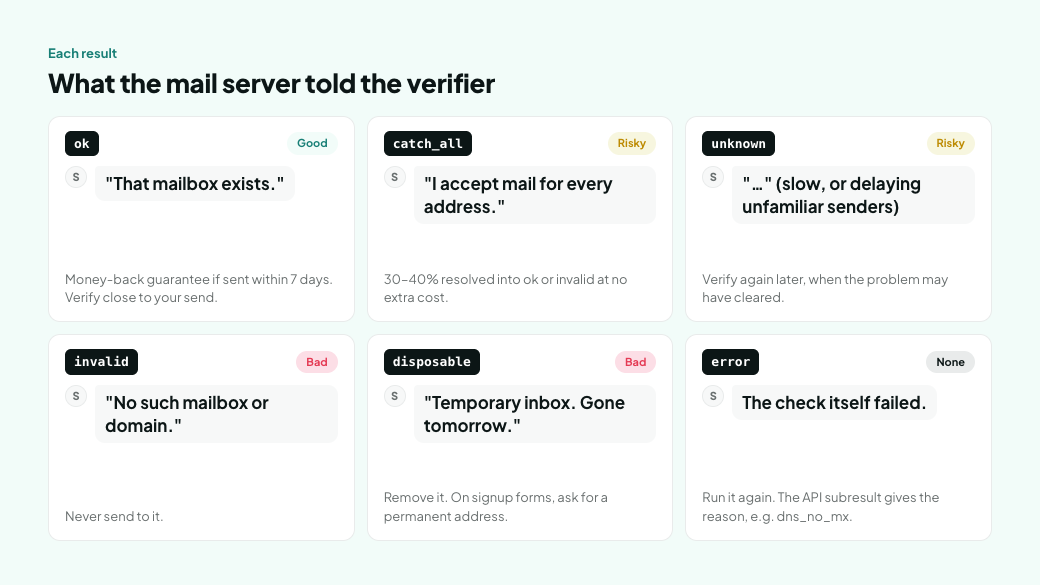
Ok (Good)
The receiving server confirmed that the mailbox exists. It's safe to send to, and it's what other verifiers usually call "valid". MillionVerifier backs Ok results with a 100% money-back guarantee: if you send to them within 7 days of verifying and your hard bounce rate is above 4%, your last payment is refunded. The guarantee covers lists uploaded on the website, not Single API checks, and needs a professional sending platform with a detailed bounce report (100% Money-Back Guarantee). The 7-day window is a good rule on its own, too: an Ok address can still bounce if the mailbox is closed after you verify it, so verify as close to your send as you can.
Catch-all (Risky)
The domain's mail server accepts mail for every address, including ones that don't exist, so no check can confirm a specific mailbox. MillionVerifier's catch-all resolution is built into its standard check and resolves 30% to 40% of catch-all addresses into ok or invalid at no extra cost (Catch-All Email Verifier). The rest stay catch-all. Some of those servers send a bounce later if the mailbox doesn't exist, and some deliver to an inbox nobody reads. If you really need the remaining ones, MillionVerifier's Verify Your Risky Emails page points to Scrubby, a paid partner service that tests risky addresses by sending to them.
Unknown (Risky)
The receiving server didn't give a clear answer. That usually means it was slow, temporarily refusing connections, or deliberately delaying unfamiliar senders. MillionVerifier's advice is to verify unknown addresses again later, when the problem may have cleared.
Invalid (Bad)
The mailbox doesn't exist, the domain can't receive mail, or the address isn't written correctly. Never send to it. If you're wondering why an address you mailed before is now invalid, 550 5.1.1 and Other Hard Bounce Codes explains the bounce codes behind it.
Disposable (Bad)
The address comes from a temporary email service, the kind people use to grab a discount or a download without giving a real address. It may work today and disappear tomorrow. Remove it, and on signup forms ask for a permanent address instead. See How to Block Disposable Emails in SaaS Signups.
Error
The check itself couldn't be completed. Run it again. For developers, the API also returns a subresult with the specific reason behind each result, such as invalid_syntax or dns_no_mx (API documentation).
What do the role and free flags mean?
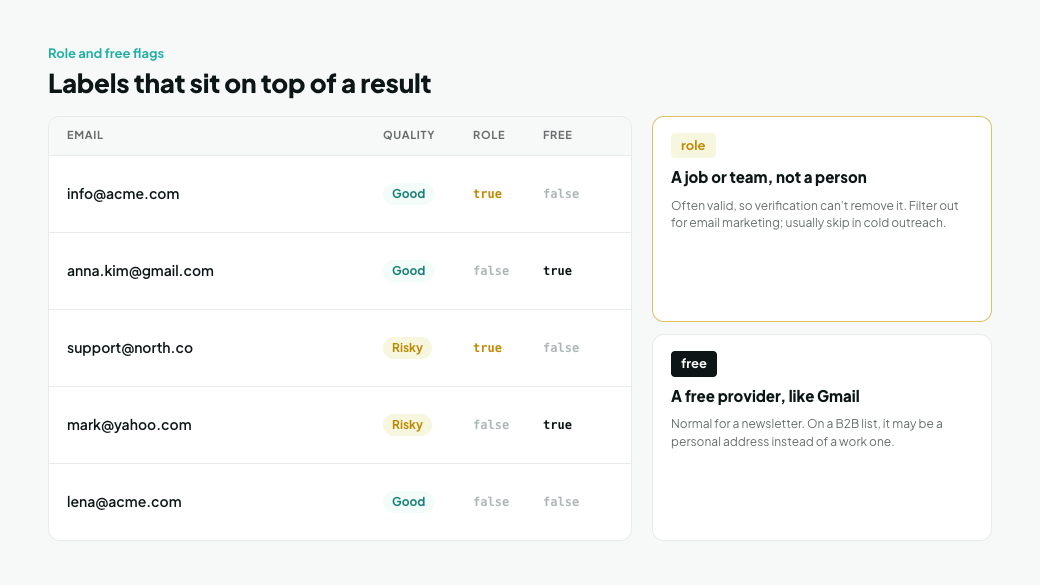
They're labels that sit on top of a result, not results of their own. An address can be Ok and role, or Risky and free. You'll find both in the full report from the Bulk Email Verifier, and the API returns them as true or false for each address (Managing Your Email Verification Results).
- Role: the address belongs to a job or team rather than a person, such as info@, sales@ or support@. Role addresses are often perfectly valid, which is why verification can't remove them for you. MillionVerifier recommends filtering them out for email marketing. For cold outreach, see Role-Based Emails in Cold Outreach for when to keep them.
- Free: the address is on a free email provider, such as gmail.com or yahoo.com. For a newsletter, that's normal and needs no action. For a B2B list, it can mean you have someone's personal address instead of their work one, so decide whether that fits what you're sending.
Which results cost a credit?
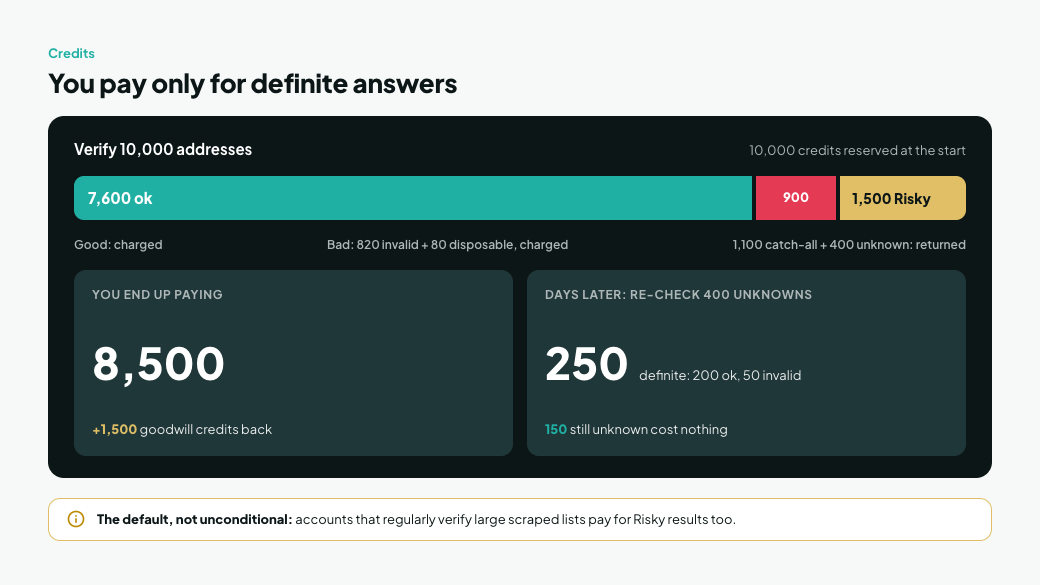
By default, you pay only for definite answers: one credit for each Good (ok) or Bad (invalid or disposable) result. When a job starts, MillionVerifier deducts one credit per email. Once verification is complete, it adds the credits for Risky results, catch-all and unknown, back as goodwill credits, across every verification method (Goodwill credits for Risky Emails). Re-checking an unknown address costs a credit only if the second check returns a definite answer.
For example, suppose you verify 10,000 addresses:
- 7,600 come back ok, 900 come back Bad (820 invalid and 80 disposable), and 1,500 come back Risky (1,100 catch-all and 400 unknown).
- You need 10,000 credits to start the job, one per email. When it finishes, the 1,500 credits for the Risky results come back, so you end up paying 8,500: 7,600 for the ok results and 900 for the Bad ones.
- A few days later, you re-check the 400 unknowns. 250 now return a definite answer, 200 ok and 50 invalid, and cost 250 credits. The other 150 are still unknown and cost nothing.
Goodwill credits are the default, not unconditional. Accounts that regularly verify scraped emails or non-subscribers in large amounts are treated as misuse accounts and pay for Risky results too. Eligibility comes back automatically once the misuse stops, though the larger the misuse, the longer that takes.
What should you do with each result?
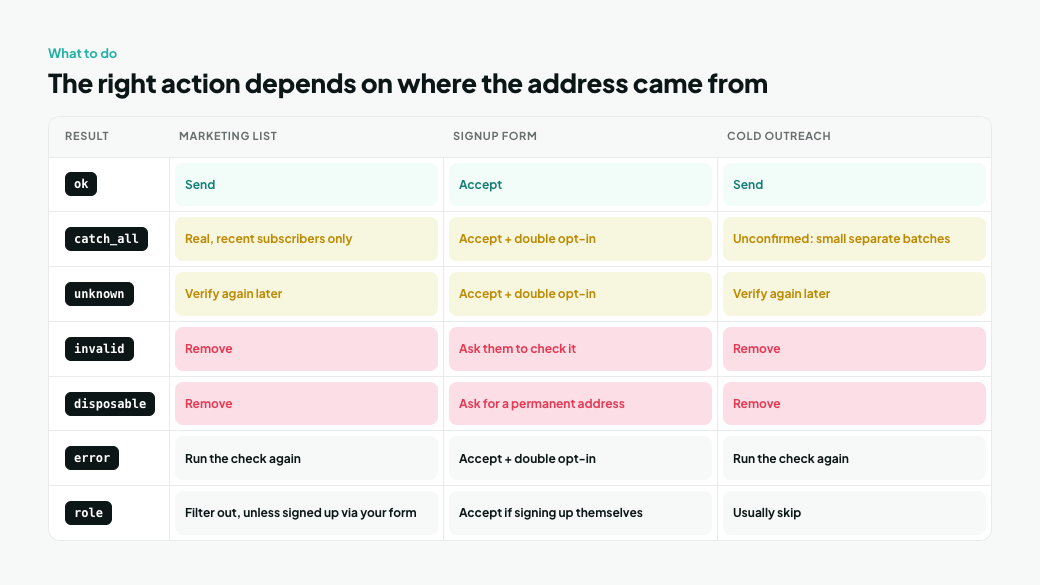
The right action depends on where the address came from. Here's how to treat each result on a marketing list, on a signup form and in cold outreach:
Result | Marketing list | Signup form | Cold outreach |
|---|---|---|---|
ok | Send | Accept | Send |
catch_all | Use only if they're real subscribers who signed up recently; otherwise set aside | Accept, and confirm with double opt-in | Treat as unconfirmed. If you test them, send separately in small batches |
unknown | Verify again later | Accept, and confirm with double opt-in | Verify again later |
invalid | Remove | Ask the person to check the address | Remove |
disposable | Remove | Ask for a permanent address | Remove |
error | Run the check again | Accept, and confirm with double opt-in | Run the check again |
role flag | Filter out, unless they subscribed through your own form | Accept if they're signing up themselves | Usually skip. Keep only the ones that are the right route in |
free flag | Normal, no action | Normal, no action | Decide whether personal addresses fit your campaign |
Credits for Risky results | Returned by default | Returned by default | Can be charged if you regularly verify large scraped lists |
Cold leads aren't subscribers, so they don't meet MillionVerifier's condition for using Risky addresses. Verifying large volumes of scraped leads can also cost an account its goodwill credits, so Risky results get charged too. If your team tests catch-all leads anyway, keep them out of your main sends and watch each batch closely, as covered in How to Handle Catch-All and Risky Emails.
Frequently asked questions
What does "risky" mean in email verification?
Risky means the receiving server didn't confirm whether the mailbox exists. In MillionVerifier, it covers two results: catch-all, where the domain accepts every address, and unknown, where the server didn't give a clear answer. Risky addresses may be safe to use if they belong to real subscribers who signed up recently.
Is a catch-all email valid?
It might be. A catch-all domain accepts mail for every address, so verification can't tell a real mailbox from a made-up one. MillionVerifier resolves 30% to 40% of catch-all addresses into ok or invalid. The rest stay Risky.
What does an unknown result mean?
The receiving server didn't answer clearly, often because it was slow or temporarily refusing connections. Verify the address again later. By default, the first unknown result costs nothing, and a re-check uses a credit only if it returns a definite answer.
What's the difference between invalid and disposable?
An invalid address doesn't exist or can't receive mail. A disposable address may work right now, but it comes from a temporary email service and is likely to disappear. Both are Bad, and you shouldn't send to either.
Can an ok email still bounce?
Yes, occasionally. A mailbox can be closed between verification and your send. Verify as close to sending as you can, and expect a near-zero hard bounce rate, not a zero one.
Is a role-based address a bad email?
Not necessarily. Role is a flag, not a result, so a role address can be Ok. MillionVerifier recommends filtering role addresses out of email marketing, and in cold outreach they're usually worth skipping.
See your own results
The fastest way to understand these results is to see them on your own list. Run it through MillionVerifier, download the full report, and you'll see every address with its result, quality, and role and free flags.
Create your free account to get 100 free credits, no credit card needed.
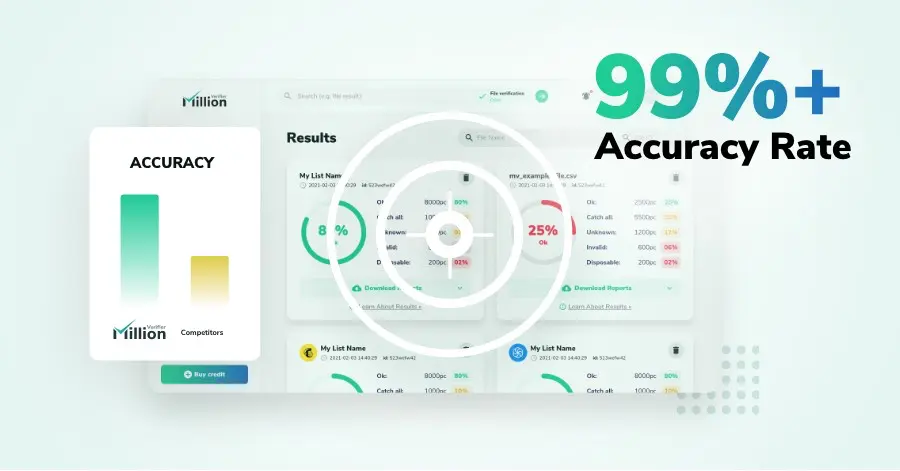
We have kept improving our email verification software for over six years now, and we are incredibly proud of our outstanding 99%+ email verification accuracy.
We have created MillionVerifier to provide the best email verification service possible for email marketers with higher email verification needs.

Our customers love what we do. We work hard to deliver the best results and user experience for our customers.